AI GRN Creator: Seamless Goods Receipt with PDF Invoice Reading
📦 AI GRN Creator: Multimodal Bill Ingestion & Instant Indent Matching
Goods Receipt Note (GRN) preparation is one of the most detail-intensive stages in inventory and supply chain management. Receiving teams must cross-check incoming physical vendor delivery bills against open Purchase Indents (POs), verify vendor GST numbers, transcribe item codes, calculate quantities across packaging boxes, and reconcile invoice taxes against purchase orders.
ERP Crystal – Symphony simplifies this entire workflow with the AI GRN Creator (/aigrncreate)—a multimodal AI tool that reads vendor PDF invoices directly, automatically matches them against open Purchase Indents, detects vendor discrepancies, and drafts complete GRNs with a single click.
🚀 What is AI GRN Creator?
The AI GRN Creator pairs natural language prompt commands with native PDF document extraction. By uploading the vendor’s digital invoice alongside a prompt referencing your internal Purchase Indent(s), the AI engine:
- Reads the PDF Invoice: Extracts the supplier’s Invoice Number, Invoice Date, Supplier GSTIN, Buyer GSTIN, Line Item Descriptions, HSN codes, and Total Bill Amount directly from the PDF document.
- Cross-Matches Purchase Indents: Fetches pending items, quantities, and agreed purchase rates from your ERP database.
- Validates Supplier Identity: Compares the GSTIN and vendor name on the bill against the indent record to safeguard against billing mismatches.
- Reconciles Quantities & Amounts: Computes box counts, checks billed amount against total received value, and prepares a fully editable GRN draft.
🌟 Key Highlights & Capabilities
- 📄 Direct PDF Invoice Reading: Upload original vendor invoice PDFs—no manual OCR setup or re-typing required.
- 🛡️ Mismatch Detection & Fraud Prevention: Displays instant comparison cards if the vendor name or GSTIN printed on the bill differs from the purchase indent.
- 🔄 Multi-Indent Consolidation: Combine shipments spanning across multiple purchase indents into a single consolidated GRN.
- 📦 Automated Box & Packaging Math: Automatically computes package counts based on standard
QtyPerBoxparameters. - ⚖️ Bill vs. GRN Total Reconciliation: Real-time indicator checks whether the vendor invoice total matches the calculated goods receipt total.
- 🔁 Dynamic Line Refetching: Add or remove indent numbers on the fly to recalculate lines without re-uploading the vendor PDF.
📸 Interface Overview
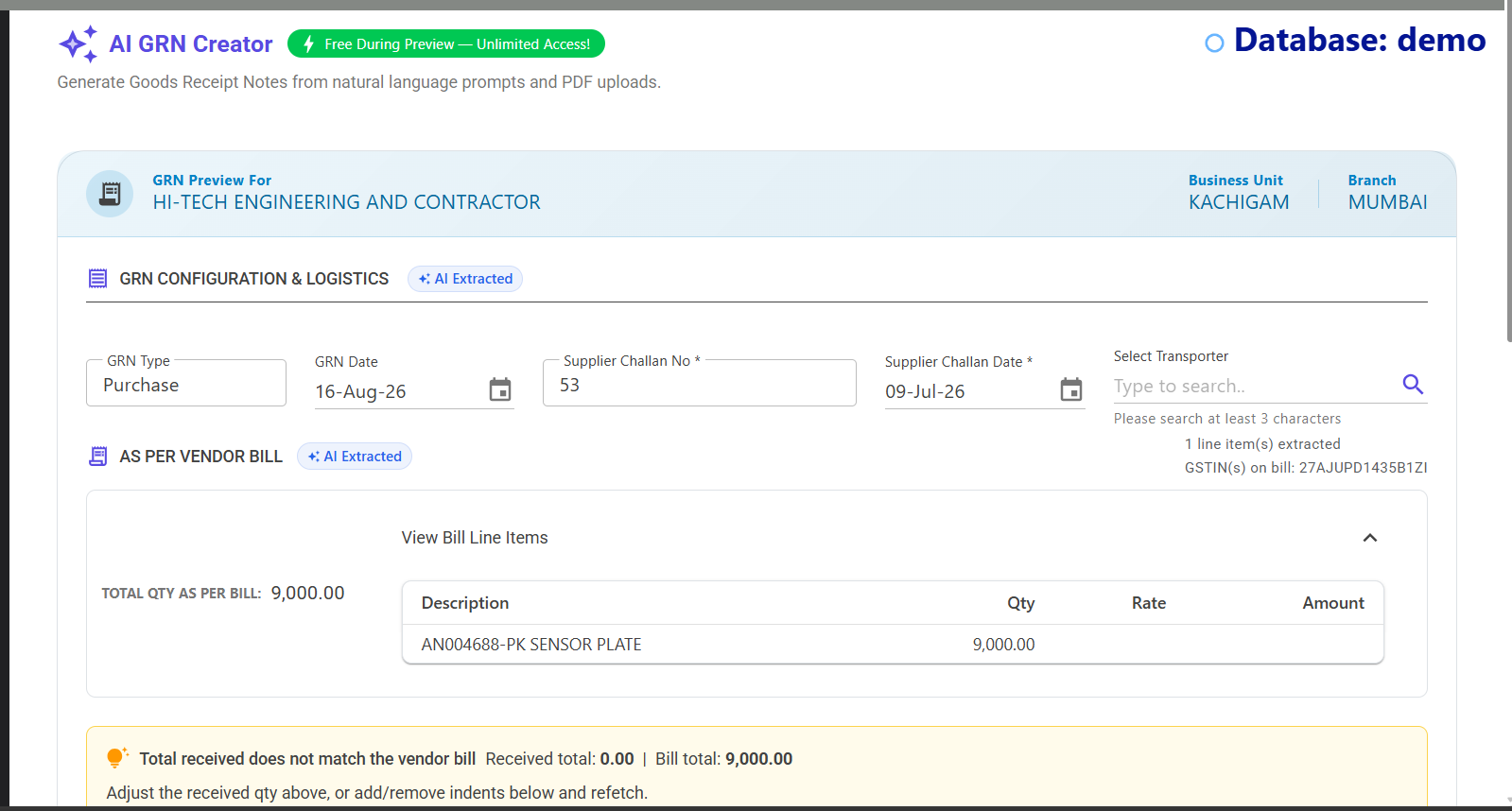
📖 Step-by-Step User Guide
1. Navigate to AI GRN Creator
In ERP Crystal Symphony, open the menu and navigate to Purchase / Stores > AI GRN Creator (or visit /aigrncreate).
2. Enter Prompt & Upload Vendor Bill PDF
To initiate the creation workflow:
- Enter Prompt: Specify the Purchase Indent number(s) in the prompt bar:
- Single Indent:
Make GRN for Indent 000589 - Multiple Indents:
Make GRN for Indent 123456, 789012 - Indent with Specific Financial Year:
Make GRN for Indent 123456 for FY 2024-25
- Single Indent:
- Upload PDF: Click the Upload PDF button and select the digital invoice received from the supplier.
- Click Generate: The AI engine processes the PDF document and links it with the indent data.
3. Supplier Verification & Mismatch Guard
Before presenting the line items, the system verifies the vendor credentials:
- If the GSTIN or vendor name on the uploaded invoice matches your purchase indent records, the preview opens smoothly.
- If a discrepancy is detected (for example, if the bill belongs to a different sister entity or wrong supplier), the system displays a clear Party Mismatch Alert showing:
- Indent Party GSTIN / Name vs. Uploaded Bill Party GSTIN / Name This prevents booking goods against incorrect suppliers or mistaken purchase orders.
4. Review Line Items & Packaging Details
Once verified, review the generated GRN draft table:
- Indent Item Mapping: Each candidate indent item is listed alongside its pending quantity and agreed rate.
- Received Quantities: Enter or confirm received counts; packaging box calculations (
QtyPerBoxand total boxes) update automatically. - Store & Storage Allocation: Select the designated Store Code (e.g., Raw Materials, General Store) and Rack location.
- Rejection & Remarks: Record any damaged or rejected quantities along with inspection remarks.
5. Reconcile Totals & Finalize
- Check Reconciliation Indicator: Compare the extracted vendor bill total against the calculated GRN receipt value to ensure complete agreement.
- Refetch Indents if Needed: If additional indents need to be included to match the total invoice amount, use the inline indent editor to dynamically refetch lines without starting over.
- Click Create GRN: Post the Goods Receipt Note directly into ERP Crystal Symphony. Stock balances, stores ledgers, and indent status update immediately.
💡 Best Practices & Pro Tips
- Clear Digital PDFs: For optimal extraction accuracy, upload clean, text-based or high-resolution scanned PDF bills from your vendors.
- Partial Shipments: If the supplier dispatched less than the full purchase order, adjust the received quantity accordingly. The remainder remains open on the Purchase Indent for future GRNs.
- Linked Records: Uploaded vendor invoice PDFs remain permanently connected to the created GRN record for future audit trails and electronic document warehouse retrieval.
🎯 Summary
The AI GRN Creator bridges the gap between unstructured vendor invoices and structured ERP inventory data. By eliminating tedious manual entry, preventing vendor mismatches, and streamlining multi-indent receipts, receiving teams can process inbound materials faster and with complete confidence.
Explore the AI GRN Creator in ERP Crystal Symphony and transform your warehouse intake operations today!