BS / PL Group Master
BS / PL Master - User Guide
1. Introduction 📝
The BS / PL Group Master is the architectural framework for your company’s financial reporting. While the Account Master lists individual ledgers (like specific banks or vendors), the BS / PL Master defines the broad buckets those ledgers fall into. It governs how your final Balance Sheet and Profit & Loss Statement are presented to stakeholders and tax authorities.
Key Objectives of BS/PL Master:
- Financial Standard: Organize accounts into globally recognized categories (Assets, Liabilities, Income, Expenses).
- Reporting Structure: Define the sequence and hierarchy of the final financial statements.
- Internal Analysis: Provide secondary grouping (MIS) for internal management performance tracking.
2. Classification Types (Flag) 🏗️
Every group created in this master must be assigned one of the following four “Flags.” This determines which side of the financial statement the group (and its linked accounts) will appear on:
- 📈 P & L Income (PI): Accounts that represent revenue (e.g., Sales, Service Income, Interest Earned).
- 📉 P & L Expense (PE): Accounts representing costs (e.g., Salaries, Electricity, Purchase of Raw Materials).
- 🏛️ Balance Sheet Asset (BA): Things your company owns (e.g., Fixed Assets, Cash in Hand, Bank Balances).
- ⚖️ Balance Sheet Liability (BL): Things your company owes (e.g., Loans, Sundry Creditors, Share Capital).
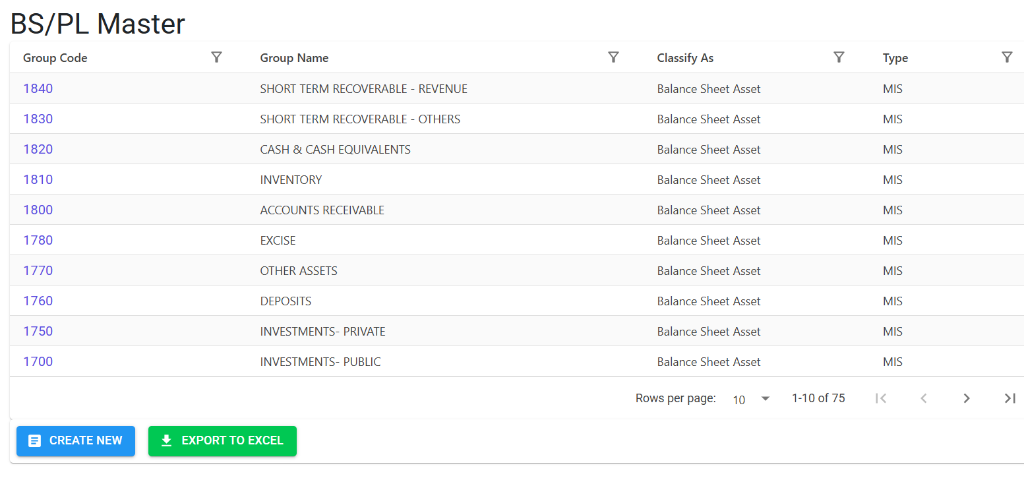
The Index Page
The BS/PL Master Index provides a structured list of all financial reporting groups. It allows you to view the hierarchy of group codes, names, and their specific classifications (Assets, Liabilities, etc.) at a glance.
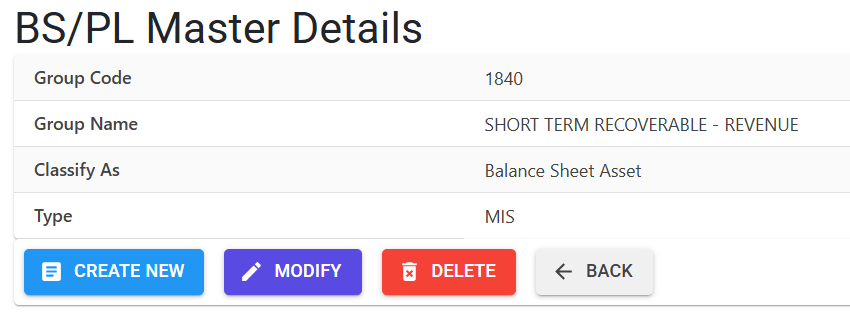
BS/PL Master Details
Clicking on a group code opens the Details View, where the reporting behavior of the group is defined:
- Classification (Flag): Determines the nature of the group:
- Balance Sheet Asset/Liability: For tracking wealth.
- P&L Income/Expense: For tracking profitability.
- Reporting Tiers: Define the Type of the group:
- Type B (BS/PL): The official statutory groupings used for primary financial statements.
- Type M (MIS): Parallel grouping used for internal management analysis and planning.
- Management Actions: Use buttons to Modify existing group attributes, Delete unused entries, or Export to Excel for external auditing.
4. Logical Constraints & Entry Standards ⚠️
- 🔢 4-Digit Group Code: Group codes are strictly 4 digits (numeric). This allows for easy sequencing in reports (e.g., 1000s for Assets, 2000s for Liabilities).
- 🔤 UPPERCASE Names: The system automatically converts Group Names to uppercase to ensure a standardized, professional look on printed financial reports.
- 🔗 Account Linking: Once a group is created, it becomes available for selection in the Account Master.
5. Integration with Financial Reports 🔄
The BS/PL Master is the primary engine behind the following:
🏛️ Standard Balance Sheet
- Navigation: Finance > Reports > Financial Reports > Balance Sheet
- Logic: The system sums up all
BA(Asset) andBL(Liability) groups to show your company’s net worth.
🧾 Profit & Loss Statement
- Navigation: Finance > Reports > Financial Reports > Profit & Loss
- Logic: Subtracts the total of all
PE(Expense) groups fromPI(Income) groups to calculate the Net Profit/Loss.
6. Guidelines for Data Integrity 🛡️
🚫 Deletion Preventions
To maintain financial consistency, the system enforces a “No-Orphan” policy:
- Active Accounts: You cannot delete a group if any ledger account in the system is currently linked to it.
- Historical Data: Groups used in past fiscal years are permanently locked and cannot be removed.
✏️ Modification Rules
- Flag Restrictions: Changing a “Flag” (e.g., moving a group from Asset to Expense) is highly restricted if transactions exist, as it would cause the Trial Balance to instantly go out of balance.
7. Best Practices / Tips 💡
- Consistent Sequencing: Use a logical numbering gap (e.g., 1000, 1100, 1200) so that you can insert new sub-groups in the future without disrupting the report order.
- Audit Ready Labels: Use descriptive names like “LONG TERM LOANS” instead of just “LOANS” to provide better clarity to external auditors.
- MIS for Cost Centers: Use MIS groups if you want to track expenses across different project types or internal departments without cluttering your main Balance Sheet.