Account Master (Chart of Accounts)
Account Master - User Guide
1. Introduction 📝
The Account Master (often referred to as the Chart of Accounts) is the fundamental blueprint of your ERP’s financial system. Every single transaction—whether it’s a sale, a purchase, a payroll payment, or a bank transfer—flows through these accounts. It organizes your business’s financial data into a logical structure that enables accurate reporting and tax compliance.
Key Objectives of Account Master:
- Financial Framework: Define every bucket where money is stored, earned, or spent.
- Reporting Foundation: Provide the data needed for Balance Sheets, P&L statements, and Trial Balances.
- Internal Control: Enforce rules on how specific accounts (like Banks or TDS) behave during transactions.
The Index Page
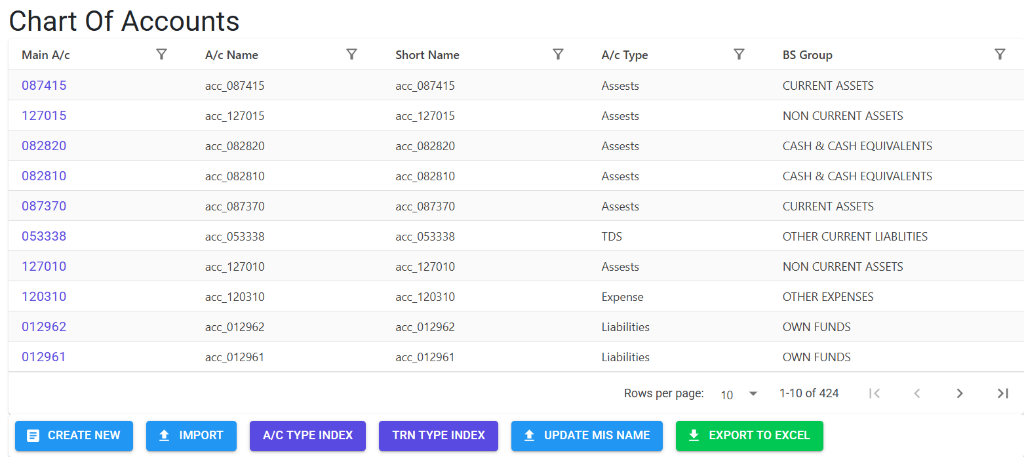
The Chart of Accounts Index provides a comprehensive list of all ledger heads. It supports advanced filtering by account type, balance sheet group, or name, and allows for bulk operations like Excel exports and data imports.
Account Master Details
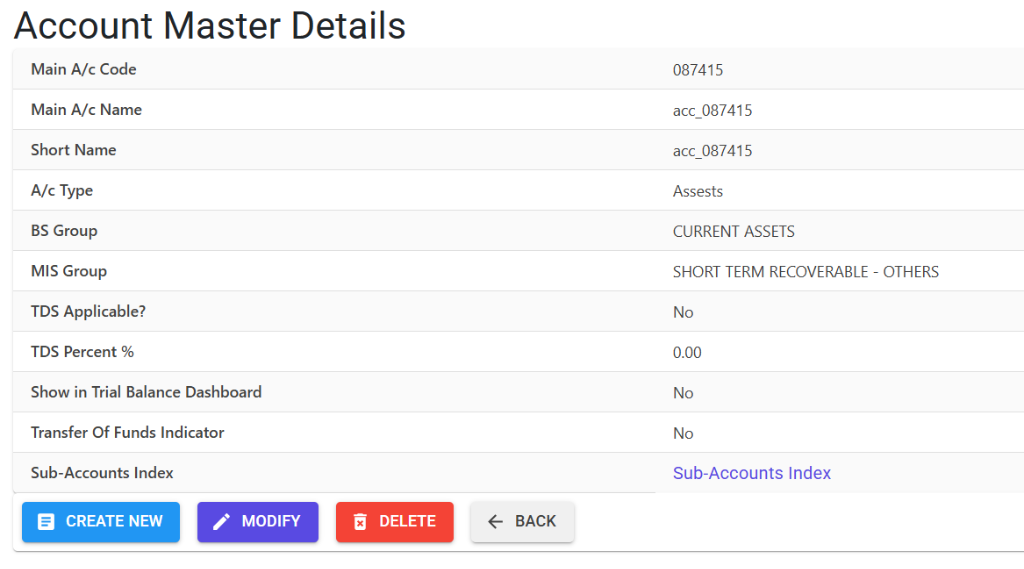
Clicking on an account code opens the Details View, where you define the structural and behavioral attributes of the ledger:
- Structural Levels: Manage the hierarchical “Main-to-Sub” relationships.
- Main Account: The primary ledger head defined by a unique 6-digit code.
- Sub-Accounts Index: Access and manage individual subdivisions linked to the main account.
- Classification: Assign the A/c Type, BS Group, and MIS Group to ensure correct financial reporting.
- Controls: Configure settings for TDS applicability, Trial Balance visibility, and Fund Transfer indicators.
3. Account Classification 🏷️
To ensure your financial statements are accurate, every account is categorized:
- Account Type: Defines the nature of the account (e.g., Bank, Cash, TDS, Sundry Debtors).
- BS Group: Links the account to its correct position on the Balance Sheet (e.g., Fixed Assets, Current Liabilities).
- MIS Group: A secondary grouping used for management-level internal reporting and cost analysis.
4. Key Features & Controls ✨
- 🛡️ TDS Applicable: When set to “Yes,” the system will automatically prompt for TDS deduction when this account is used in a Purchase or Expense Voucher.
- 📉 Allow Negative Balance: Typically used for Bank Overdraft accounts, allowing the ledger to drop below zero without stopping transactions.
- 📊 Trial Balance Dashboard: A flag that determines if this specific account should be highlighted in your high-level financial health summaries.
- 💸 Transfer of Funds (TOF): Specifically for Bank accounts, identifying them as eligible for internal fund transfers.
5. Daily Usage & Transactions 🔄
The Account Master is the “engine room” for the following modules:
📗 Finance Vouchers
Accessed via Finance > Transactions > Vouchers / Receipts. Every line item in a Cash, Bank, or Journal voucher must be linked to a valid Main and Sub Account.
👤 Party & Personnel Management
When creating a Customer, Vendor, or Employee, the system automatically links them to a specific Ledger Account to track their outstanding balances.
6. Financial Reports 📈
🏦 Cash / Bank Book
- Navigation: Finance > Reports > Cash / Bank Book
- Purpose: Detailed daily tracking of all inflows and outflows for accounts typed as ‘Cash’ or ‘Bank’.
📑 Ledger Statements
- Navigation: Finance > Reports > Financial Reports > Ledger
- Purpose: The “source of truth” for any specific account, showing every debit and credit entry over a selected date range.
🏛️ Financial Statements (P&L / Balance Sheet)
- Navigation: Finance > Reports > Financial Reports
- Purpose: High-level summaries grouped by BS Group, showing the overall profitability and financial position of the company.
🧾 Receivables & Payables (AR/AP)
- Navigation: Finance > Reports > Receivables/Payables
- Purpose: Specifically tracks what is owed to you by customers and what you owe to vendors.
7. Guidelines and Integrity Logic ⚠️
Entry Standards
- Strict Coding: Main Account codes must be exactly 6 digits.
- Mandatory Short Names: Short names are required for clean display on mobile screens and summary grids.
- Audit Trail: Any modification to an existing account requires an Audit Trail Note, explaining why the change was made (e.g., “Updated group for better tax reporting”).
8. Deletion & Modification Preventions 🛡️
To prevent financial chaos, the system enforces these strict rules:
🚫 Deletion Preventions
You cannot delete an account if:
- It has any historical transaction (Opening balance or current year vouchers).
- It is currently linked to a Customer or Vendor profile.
- It has active Sub Accounts linked to it (you must delete the sub-accounts first).
✏️ Modification Rules
- Code Lockdown: Once a Main Account or Sub Account code is used in a transaction, it cannot be changed.
- Type Restrictions: You cannot change an “Account Type” (e.g., from Bank to Cash) if there are existing entries, as this would corrupt historical reports.
9. Best Practices / Tips 💡
- Nesting Strategy: Use Sub Accounts for individuals or specific projects, and Main Accounts for broad categories.
- Regular Reconciliation: Use the Bank Reconciliation module (
Finance > Transactions) to ensure your ERP bank balances match your physical statements. - Audit Ready: Always provide clear, descriptive names. Avoid abbreviations that might confuse an external auditor later.