RTGS / Bank Transfer Master
RTGS Master - User Guide
1. Introduction 📝
The RTGS Master (Electronic Funds Transfer Master) is a secure vault for storing the banking information of everyone your company pays. This includes Vendors (Parties) and Employees. By centralizing this data, the ERP ensures that payments are sent to the correct account No and IFSC code, eliminating manual entry errors during the payment process.
Key Objectives of RTGS Master:
- Payment Accuracy: Store verified Account Numbers and IFSC codes to prevent transfer failures.
- Bulk Processing: Enable the generation of “Bank Upload Files” for thousands of payments at once.
- Data Integrity: Enforce strict validation on bank formats (like 11-character IFSC codes).
The Index Page
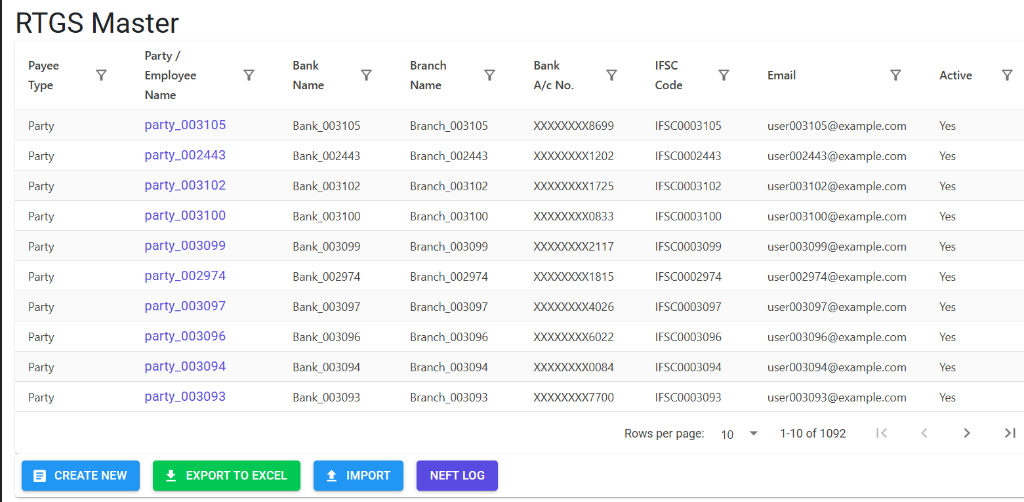
The RTGS Master Index provides a bird’s-eye view of all configured bank transfer details. It allows for quick searching across payee types (Party/Employee), bank names, and account numbers.
RTGS Master Details
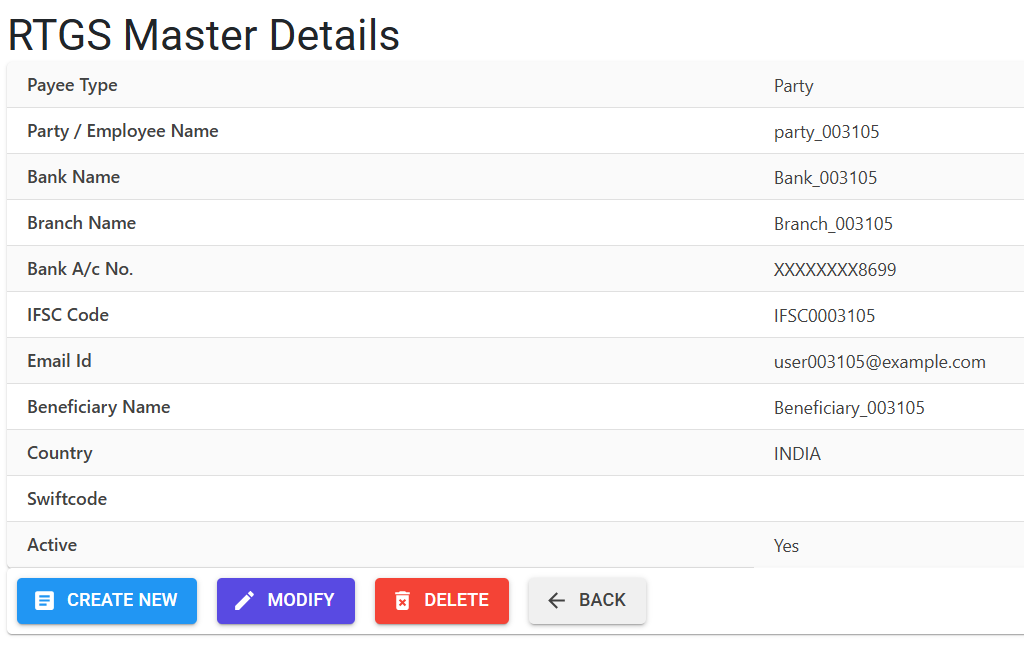
Clicking on a record identifier opens the Details Screen, which organizes the secure banking information for the payee:
- Structure & Payee Types: Defines the relationship between the system and the recipient.
- Type Party: For external Vendors, Contractors, and Customers.
- Type Employee: For internal staff, linked to the Employee Master for payroll.
- Security & Verification: View verified Account Numbers (masked for security), IFSC codes, and contact emails.
- Actions: Perform bulk operations using the Export to Excel and Import tools, or view the history of electronic transfers via the NEFT LOG button.
3. Core Information Required 📋
To ensure a transfer is never rejected by a bank, the following fields are mandatory:
- 🏦 Beneficiary Name: The exact name as it appears on the payee’s bank passbook.
- 🔢 Account Number: Validated to be between 6 and 20 digits.
- 🆔 IFSC Code: A strict 11-character code (e.g.,
HDFC0001234). The system automatically checks that the 5th character is always a zero (0). - 🌍 SWIFT Code: Optional, used primarily for international wire transfers.
- 📧 Email ID: Used by the system to send an automated “Payment Advice” to the recipient once the transfer is successful.
4. Bulk Import (Excel) 📥
For companies with hundreds of vendors or employees, the manual entry of bank details is inefficient. The RTGS Master includes a powerful Excel Import tool:
- Download Template: Access
Finance > Masters > RTGS Importand download the standard model. - Fill Data: Enter your vendor/employee codes and bank details into the spreadsheet.
- Upload & Validate: The system performs a “Pre-check” and generates an Error Report if any data is incorrect (e.g., “Duplicate Account No” or “Invalid Employee Code”).
- Final Commit: Once the errors are cleared, the data is pushed into the live master.
5. Daily Usage & Integration 🔄
📊 RTGS Register
- Navigation: Finance > Reports > RTGS Register
- Purpose: This is the most critical report for the finance team. It lists all vouchers marked for electronic payment. You can export this report to a CSV/Excel format that matches your bank’s Bulk Upload Portal requirements.
💰 Payment Vouchers
When creating a Bank Payment, the system automatically pulls the Active bank details from this master. If a vendor has changed their bank, the old record must be deactivated before the new one can be used.
6. Guidelines and Integrity Logic ⚠️
Entry Standards
- CAPITAL LETTERS: The system automatically converts Bank Names, Branch Names, and IFSC codes to uppercase for banking compatibility.
- Strict IFSC Regex: The system will reject any IFSC code that doesn’t fit the standard 11-character Indian banking format.
7. Deletion & Modification Preventions 🛡️
🚫 Deletion / Inactivation Rules
- Duplicate Safeguard: The system prevents the same Bank Account Number from being registered twice, protecting against accidental double-entry.
- Usage Locking: If a bank account has been used in a past RTGS transfer, it cannot be deleted. Instead, you must set the Is Active flag to “No.”
✏️ Modification Rules
- Re-Verification: Any change to an Account Number or IFSC code should be double-checked against a cancelled cheque or a bank statement provided by the payee.
8. Best Practices / Tips 💡
- Initial Setup: Use the Excel Import for the initial bulk setup of employee bank accounts to save time.
- Email Notifications: Ensure the Email field is accurate; this reduces the number of “Did you pay us?” calls from your vendors.
- Regular Cleanup: Periodically review the RTGS Master and mark accounts for closed bank branches or retired employees as Inactive.