Carry Forward Accounts & Financial Year Migration
Carry Forward Accounts & Financial Year Migration - User Guide
1. Introduction 🏁📊
Financial continuity is a core requirement of any enterprise system. The Carry Forward Accounts module is a strategic utility designed to handle the transition between financial years. Its primary function is to migrate the “Closing Balances” of all General Ledger accounts from the current year into the “Opening Balances” of the new financial year, ensuring a seamless start to your morning on April 1st (or your specific year-start).
Purpose of this Report:
- Balance Continuity: Ensure that your financial history remains unbroken across multiple years.
- Automated Opening Balances: Eliminate the manual effort of keying in opening balances for the new year.
- Audit Synchronization: Synchronize your book adjustments with the new year’s opening statements.
This module is essential for Finance Directors, Senior Accountants, and IT Administrators.
2. Key Features 🚀
A. Balance Migration Engine
The system performs a full scan of the current financial year’s Trial Balance. It identifies all Asset, Liability, and Equity accounts with non-zero closing balances and prepares them for migration.
B. Automated Year-Label Mapping
The system intelligently calculates the target year. If your current active year is 2023-24, the system will automatically target 2024-25 for the opening entry creation, reducing the risk of clerical errors.
C. Multi-Run Capability
If you make last-minute adjustments in the previous financial year after you have already started the new year, you can simply “Re-run” the Carry Forward. The system will delete the old opening balances and update them with the corrected figures.
3. High-Security Workflow 🛠️
- Explicit Confirmation: Due to the high impact of this tool, it requires explicit confirmation via a secure message box.
- Role-Based Restriction: Only users with “Administrative Access” can execute the Carry Forward, ensuring that accidental migrations do not occur.
- Data Validation: The system verifies that the target financial year has been correctly initialized in the system database before proceeding.
4. Understanding Data Indicators 📊
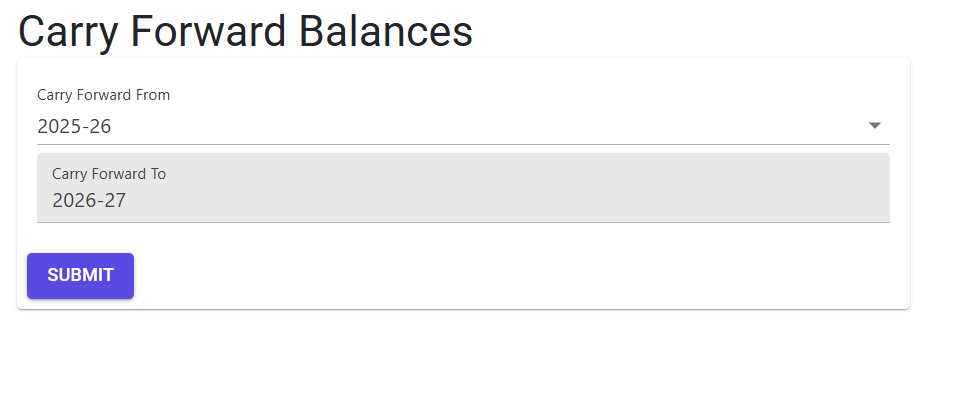
- Carry Forward From: The source financial year from which the closing balances are taken.
- Carry Forward To: The target financial year where the opening balances will be created.
- Cfd Status: A green indicator confirming that the migration was completed successfully.
5. Source Transactions 🔄
The migration engine synthesizes data from:
- General Ledger Master: The source of current closing balances.
- Date Masters: Defines the start and end dates of the financial cycles.
- Opening Balance Table: The target repository for the next year’s starting data.
6. Best Practices / Tips 💡
- The “Comparison” Rule: After performing a Carry Forward, always run a Comparison Trial Balance across both years. The “Closing Balance” of the old year must exactly match the “Opening Balance” of the new year.
- Sync Before Final Audit: Perform a preliminary Carry Forward as soon as the new year begins. However, do a “Final Sync” only after your external auditors have signed off on the final adjustments of the previous year.
- Database Backup: As a general IT policy, ensure a full database backup is taken before performing any large-scale year-end migration.