Transfer of Funds (Contra Entry)
Transfer of Funds Module - User Guide
1. Introduction 📝
The Transfer of Funds (often referred to as a Contra Entry) module manages the internal movement of money between different company accounts. This includes bank-to-bank transfers, cash deposits into banks, or cash withdrawals. The module is uniquely designed to automate the accounting process by generating a balanced pair of Receipt and Payment vouchers in a single action.
In the overall business flow:
- Recording Inter-Bank Transfers (e.g., shifting funds from HDFC to ICICI).
- Processing Cash Deposits and Withdrawals.
- Consolidating funds from various collection centers into a central treasury account.
Typically, this module is used by Treasury Officers, Cashiers, and Accountants.
2. Getting Started with Transfer of Funds 🚀
Accessing the Module
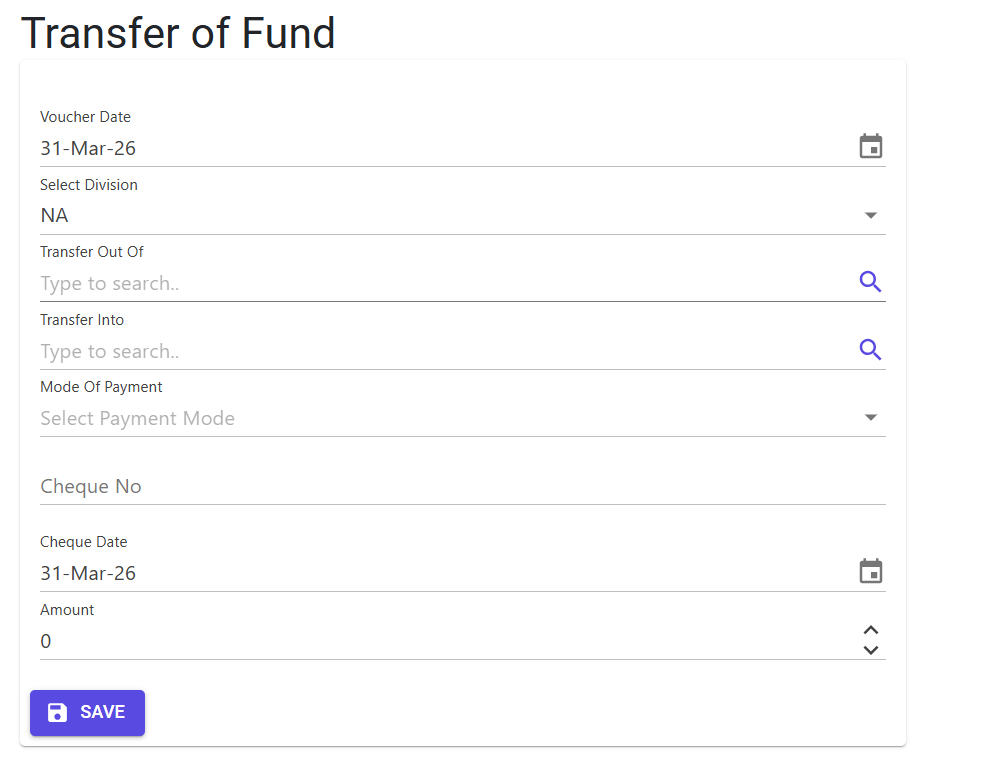
Navigate to Transfer of Funds within the Financials or Voucher menu. Unlike standard vouchers, this is a dedicated utility designed for speed and consistency.
The “Dual-Voucher” Architecture
When you save a Transfer of Fund entry, the system automatically creates:
- Payment Voucher (P): Deducts the amount from the
Transfer Out Ofaccount. - Receipt Voucher (R): Adds the same amount to the
Transfer Intoaccount.
These two vouchers are linked through a system-generated Funds Transfer account, ensuring a zero-sum balance in the general ledger.
3. Features & Benefits ✨
⚡ Automated Accounting
- One-Click Entry: Instead of manually creating one Payment and one Receipt, you simply specify the “From” and “To” accounts.
- Automatic Sub-Numbering: The system intelligently manages unique
VoucherSubNosequences for each bank treasury independently.
💰 Cash Collection Synchronization
- Balance Validation: For specialized collection accounts, the system automatically computes the current balance and forces the transfer of the exact amount, preventing partial or over-transfers.
- FY Integrity: Validates that all cash collection movements stay within the boundaries of the active Financial Year.
📊 Clean Audit Logging
- Traceable Source: Every voucher generated via this module is tagged with the note “Created from Transfer of Fund” in the
MFGLog, making it easy for auditors to distinguish contra entries from standard vendor payments.
4. Complete Flow 🔄
Specify Accounts
- Transfer Out Of: The source bank or cash account.
- Transfer Into: The destination bank or cash account.
Define Transaction Details
- Enter the Voucher Date and Transfer Amount.
- Provide the Cheque/UTR details (if moving between banks).
- Select the Division to ensure departmental accounting is accurate.
Validation & Processing
- The system checks for the presence of a Funds Transfer account type in the CoA (Chart of Accounts).
- It verifies that “Out” and “In” accounts are not identical.
- Upon saving, the system creates two separate vouchers with independent system numbers.
5. Validations and Logic ⚠️
Pre-Requisites
- Chart of Accounts (CoA) Setup: You must have at least one account in your CoA with the Account Type set to
Funds Transfer. Without this, the module remains locked to prevent accounting errors.
Transaction-Level Validations
- Duplicate Source/Dest: The system prevents selecting the same account for both “Transfer Out” and “Transfer Into.”
- Cheque Date Window: Cheque/Instument dates must be within +/- 90 days of the transaction date.
- System Processing Lock: If the parameter
AllowCreateVoucheris set to ‘N’ (system-wide lock), transfers are disabled.
Specialized Collection Logic
- Exact Balance Transfer: If the source account is a defined “Collection Account”:
- The system calculates the current book balance.
- It requires the transfer amount to match the balance exactly.
- It prevents the transfer if the balance is zero or negative.
- Financial Year Guard: For collection transfers, the
CashCollDatemust fall within the current FY dates.
6. Best Practices / Tips 💡
- Instrument Tracking: Always fill in the Cheque No or UTR No, even for internal transfers. This is critical for matching entries when doing bank reconciliations later.
- Tuning Up: Use the Database Tune Up option (if available) periodically to ensure the underlying voucher sequences and sub-numbers stay optimized.
- Audit Check: If you need to trace why a specific receipt was created, check the
MFGLogfor the “Created from Transfer of Fund” tag.