Pay Head Master
Pay Head Master - User Guide
1. Introduction 📝
The Pay Head Master defines the building blocks of your organization’s salary structure. Every component that appears on an employee’s payslip—from their Basic Salary to their Provident Fund contribution—is defined as a “Pay Head.”
Key Objectives of Pay Head Master:
- Component Definition: Standardize the names and types of all salary additions and subtractions.
- Payroll Accuracy: Ensure consistent calculations across different departments and grades.
- Statutory Alignment: Categorize heads for tax and labor law compliance (PF, ESI, TDS).
The Index Page
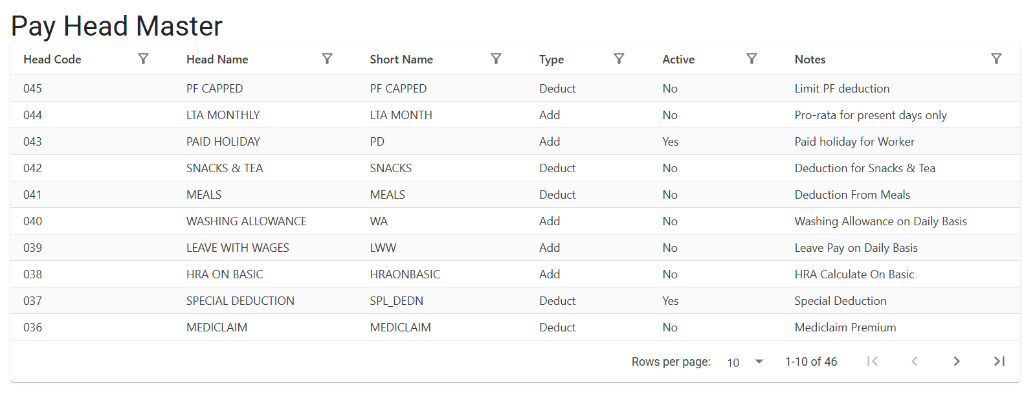
The Pay Head Master Index provides a unified view of all defined salary components. It displays the head codes, full names, short names for payslip display, and the nature of each head (Addition or Deduction). You can also quickly verify the active status and internal notes for each component.
2. Core Attributes 🏗️
A. Name & Short Name
- Pay Head Name: The full display name (e.g., “House Rent Allowance”).
- Short Name: A 3 to 5 character abbreviation (e.g., “HRA”). This is used in compact reports and on the printed Payslip to save space.
B. Pay Head Type (Nature)
Every pay head must fall into one of two categories:
- Add (Earnings): Any component that is paid to the employee.
- Examples: Basic, DA, HRA, Conveyance, Bonus.
- Deduct (Deductions): Any component that is subtracted from the gross salary.
- Examples: PF Employee Contribution, ESI, Professional Tax, TDS, Loan Recovery.
C. Active Status
- Is Active: If set to “No,” this pay head will no longer be available for selection in new salary structures. However, historical records will remain untouched for auditing.
3. Role in Payroll Processing 🔄
The Pay Head Master is the foundation for two critical processes:
1. Salary Setup (SetupPayroll)
When you define an employee’s monthly CTC, you select different Pay Heads and assign them values. These heads are then saved as the employee’s “Fixed Salary Structure.”
2. Monthly Computation (ComputePay)
During the monthly payroll run, the system pulls all “Active” pay heads assigned to an employee and calculates the Net Pay by summing up the “Add” types and subtracting the “Deduct” types.
4. Usage Guidelines 📋
Categorizing Your Heads
- Fixed Heads: Basic, HRA, and fixed allowances.
- Statutory Heads: PF, ESI, and PT (usually calculated via formulas linked to these heads).
- Variable Heads: Overtime, Incentives, or one-time Deductions.
5. Deletion & Modification Rules 🛡️
🚫 Why Deletion is Restricted
Pay Heads are rarely deleted in the ERP. This is because they are linked to years of historical payroll data.
- Audit Integrity: If you delete a head that was used in 2024, the 2024 payslip reports would break.
- The “Inactive” Solution: If a pay head (like a specific “COVID Allowance”) is no longer used, simply set its status to Inactive.
6. Integration & Reports 📈
📑 Payslip Generation
- Navigation: HR > Reports > Payroll > Payslip.
- Effect: The names and short names defined here appear as the line items on every employee’s salary slip.
📑 Payroll Analysis (Head-wise)
- Navigation: HR > Reports > Analysis > Payhead Summary.
- Purpose: Allows management to see the total company-wide spend on a specific head (e.g., “How much did we spend on HRA this quarter?”).
7. Best Practices 💡
- Clear Short Names: Choose short names that are easily recognizable (e.g., use
ADVfor Advance rather than justA). - Avoid Duplication: Before creating “Special Allowance,” check if “Other Allowance” already exists.
- Notes: Use the “Notes” field to document the legal or internal reason for the pay head (e.g., “As per Minimum Wages Act”).