Compute Pay (Bulk Bonus & Yearly Accruals)
Compute Pay Module - User Guide
ℹ️
⚡ Quick Start: 3-Minute Fast Track
For HR managers performing the yearly bonus run:
- Selection: Choose the Year Label (e.g., 2024-25) and set Type to B (Bonus).
- Validation: Click Validate to ensure no duplicate bonus has been posted for this FY.
- Target: Set the Pay Month (the month you want the bonus to appear in).
- Compute: Click Compute Bonus to run the bulk calculation engine.
- Finalize: Review the results in the Payroll Management module for that specific month.
🗺️ Process Flow: Yearly Accrual Cycle
graph TD
    FY[Financial Year Setup] --> Monthly[Standard Monthly Payroll]
    Monthly -- 12 Months Finalized --> Compute[Compute Pay Engine]
    Compute --> Bonus[Yearly Bonus Calculation]
    Bonus --> Post[Post to Target Pay Month]
    Post --> Final[Disburse with Salary]

    style Compute fill:#f9f,stroke:#333,stroke-width:2px
✅ Prerequisites Checklist
Before running the yearly computation, ensure:
- Finalized Payroll: All 12 months of the fiscal year must be finalized.
- FY Master: The current financial year must be correctly defined.
- Bonus Rules: Statutory percentages must be configured in the system parameters.
- Backup: A database backup is highly recommended before running this bulk process.
1. Introduction 📝
The Compute Pay module is a specialized high-level engine designed for bulk payroll operations that occur outside the standard monthly salary cycle. Its primary function is the Computation of Yearly Bonus and other statutory accruals.
ℹ️
In the overall business flow:
- Scans employee earnings across the entire Fiscal Year (FY).
- Calculates Bonus Entitlements based on statutory percentages or predefined company rules.
- Maps these yearly computations into the payroll ledger for disbursement in a specific target month.
Typically, this module is used by Payroll Managers and CHROs (Chief Human Resource Officers) once a year.
2. Getting Started 🚀
Accessing the Module
Navigate to Compute Pay. Unlike the standard monthly setup, this module focuses on the Year Label (e.g., 2023-24) to define its calculation boundary.
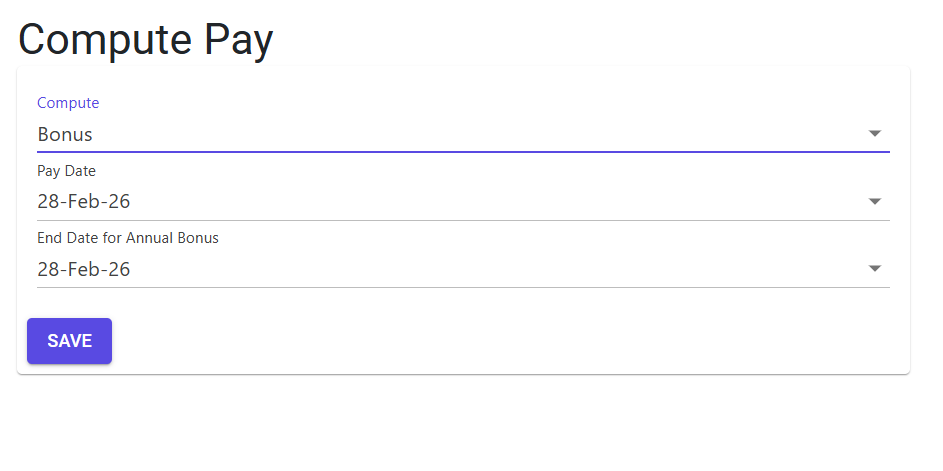
Core Calculation Types
- Bonus Computation (Type B): The main operative type, used to calculate the annual bonus for all eligible employees.
- Statutory Accruals: Logic for calculating other yearly entitlements like Gratuity projections or Leave Encashment accruals (if configured).
3. Features & Benefits ✨
🛡️ One-Time Calculation Lock
- Duplicate Bonus Guard: The system includes a strict fiscal lock. If a bonus has already been computed and posted for the current financial year (
FYStarttoFYEnd), the system will block any second attempt. This prevents the catastrophic risk of double-posting yearly bonuses.
📅 Fiscal Year Intelligence
- FY-Dates Sync: The module automatically pulls the
fystartandfyendfrom the Financial Year Master. It ensures that the base salary data used for bonuses is accurately clipped to the statutory fiscal period.
⚡ Bulk Generation
- Automated Posting: Once computed, the “Generate Pay” process automatically pushes these amounts into the employee’s payroll record for the selected disbursement month, making them visible in the Payroll Management module for final verification.
4. Complete Flow 🔄
Define Fiscal Year
- Select the current Year Label (e.g., 2024-25).
- Choose the Compute Type (Select
Bfor Bonus).
Run Validation
- Trigger the Validate process.
- The system checks if a bonus record already exists for this FY.
- If successful, the module retrieves the list of eligible employees.
Computation & Generation
- Set the Target Pay Month (the month in which the bonus should be paid).
- Click Compute Bonus or Generate Pay.
- The system scans the yearly ledger and calculates the bonus per employee based on their total earnings and the defined percentage.
Final Verification
- Navigate to the Payroll module for the target pay month to see the added “Bonus” entries for each employee.
- Finalize the payroll as per the standard monthly cycle.
5. Validations and Logic ⚠️
Safety Logic
- The Duplicate Rule: Before starting a bonus run, the system executes
GetBonusCount. If the count is> 0, it means the data has already been finalized/extracted for this FY. - FY Boundary Rule: The system strictly enforces calculations between
fystartandfyend. Any salary data from the previous or next fiscal year is ignored to ensure audit compliance.
Operational Guards
- Target Month Matching: The system ensures that the bonus is posted to an “Open” pay month. You cannot post a yearly bonus to a month that has already been finalized.
6. Related Reports 📊
- 📑 Yearly Bonus Summary: A detailed report showing the total qualifying salary and calculated bonus per employee.
- 📈 Statutory Bonus Provision: Financial projection report for accounting provisions before the actual payout.
- 📐 Eligibility Audit: Lists employees who were excluded from the bonus run (e.g., due to joining date or specific category rules).
7. Best Practices / Tips 💡
- Finalize FY Standard Payroll First: Before computing bonuses, ensure that all 12 months of the fiscal year have been officially finalized in the Setup Payroll module. Any un-finalized months will result in inaccurate bonus calculations.
- Backup: It is recommended to perform a database backup before triggering any bulk “Generate Pay” operation in this module, as it modifies many employee records at once.
- One-Run Policy: Treat the bonus run as a single-event process. If adjustments are needed for a few employees, it is better to fix them manually in the Payroll module rather than re-running the entire yearly computation.