Process Master
Process Master - User Guide
1. Introduction 📝
The Process Master is the heart of your manufacturing configuration. It defines the specific technical steps (e.g., “Lathe Machining,” “Powder Coating,” “Final Assembly”) that transform raw materials into finished goods. By categorizing these steps by Product Line, the ERP can accurately map out production routes for every item you manufacture.
Key Objectives of Process Master:
- Manufacturing Definition: Catalog every unique manufacturing operation performed in-house.
- Product Line Mapping: Group processes into logical families based on the type of product they support.
- Capacity Tracking: Provide a reference point for measuring how much work each process can handle.
2. Getting Started 🚀
Accessing the Module
Navigate to Manufacturing Setup > Process Master.
The Index Page
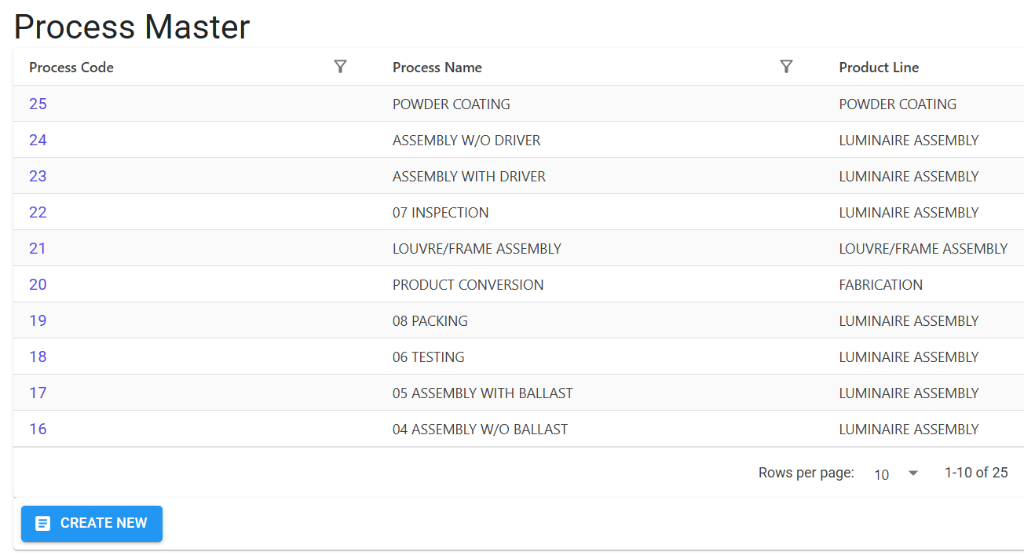
The Index Page displays all manufacturing processes defined in the system. It allows you to search for processes by their code, name, or the product line they are mapped to.
Process Details
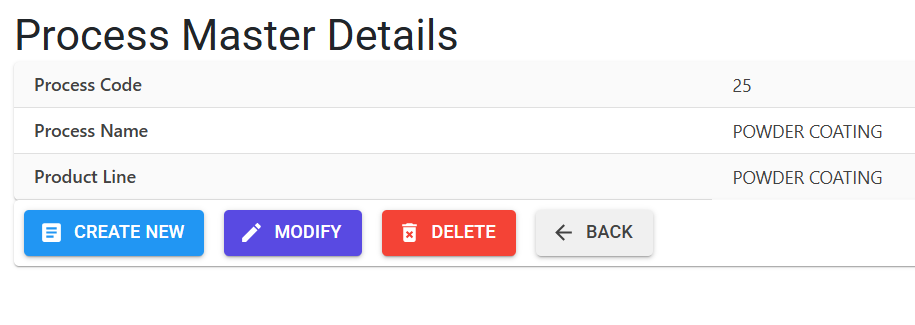
Clicking on a process code opens the Details View. This page provides the full configuration for the manufacturing step:
- Relationship with Product Lines: Every process is assigned to a specific Product Line. This mapping ensures that when building a Bill of Materials (BOM), you only select processes relevant to that product category.
- Management Actions: Use the action buttons to Modify existing process names, Delete unused entries, or Create New processes.
3. Key Features ✨
🏷️ Simplified Workflow (Auto-Coding)
The system automatically generates a unique 2-digit Process Code for every new entry. This keeps the database organized and ensures that manufacturing steps are easily searchable in high-volume production grids.
🛡️ System Capacity
To maintain operational efficiency and reporting speed, the system supports a maximum of 99 unique process definitions.
4. Usage Across Modules & Transactions 🔄
The Process Master is a mandatory component in the following areas:
📜 Bill of Materials (BOM)
When defining how an item is made, you select one or more processes from this master. This forms the “Standard Operating Procedure” for that product.
🏭 Manufacturing Execution (IIRS)
The Internal Inspection Release Sheet (IIRS) tracks actual production data against these processes. For every batch produced, the system records:
- Which process was performed.
- The quantity passed versus rejected.
- The time taken for completion.
5. Related Reports 📊
📊 BOM Reports
- Navigation: Manufacturing > Reports > BOM Reports
- Purpose: Provides a master list of all Bill of Materials (
BOM_List.xlsx) and detailed technical breakdowns (BOQ_Report.xlsx). Since processes are the building blocks of every BOM, these reports are essential for verifying your manufacturing routes.
📈 Consumption Of Material
- Navigation: Manufacturing > Reports > Consumption Of Material
- Purpose: Tracks exactly which materials were used during production.
Actual_Consumption_Report.xlsx: Shows materials consumed at each specific process.IIRS_Consumption_LeadTime.xlsx: Combines consumption data with timing to analyze process efficiency.
📉 Job Analysis
- Navigation: Manufacturing > Reports > Job Analysis
- Purpose: The primary report for monitoring shop floor progress.
JobOut_Report.xlsx: Shows work sent to a process.JobIn_Report.xlsx: Tracks work completed at a process, helping identify bottlenecks in real-time.
6. Guidelines and Logic ⚠️
Entry Standards
- Unique Naming: The system prevents duplicate names to ensure that “Machining” and “Milling” are clearly distinguished without ambiguity.
- Standardized Formatting: All process names are automatically converted to UPPERCASE for uniform document printing and reporting.
7. Deletion & Modification Preventions 🛡️
To protect the integrity of your manufacturing history and engineering standards, the following rules are strictly enforced:
🚫 Deletion Preventions
You cannot delete a Process if:
- It is currently used in any Bill of Materials (BOM).
- It has been recorded in any historical Production Batch (IIRS). If a process is tied to even one past or current document, the system will block its removal and show you exactly where it is being used.
✏️ Modification Rules
- Immutable Codes: The Process Code assigned by the system cannot be modified after saving.
- Mapping Updates: You can change the linked Product Line at any time, but be aware of its impact on filtering in the BOM module.
8. Best Practices / Tips 💡
- Be Specific: Instead of a generic process like “Production,” use specific names like “Primary Injection Molding” to get better quality insights.
- Review Product Lines: Group processes into broad Product Lines to make the BOM dropdowns shorter and faster for your engineers to use.
- Periodic Audit: Regularly review your process list to ensure that obsolete manufacturing steps are marked clearly or retired if no longer in use.