Shift Master
Shift Master - User Guide
1. Introduction 📝
The Shift Master is a core operational configuration that defines the working hours and schedules for your facility. It provides the framework for tracking when work is performed, who is performing it, and how productive the facility is across different times of the day.
Key Objectives of Shift Master:
- Production Scheduling: Define start and end times for Daily, Morning, Evening, and Night shifts.
- Resource Allocation: Assign employees to specific working windows.
- Productivity Analysis: Enable the comparison of manufacturing output across different shifts.
2. Getting Started 🚀
Accessing the Module
Navigate to Manufacturing Setup > Shift Master or HR Management > Shift Configuration.
The Index Page
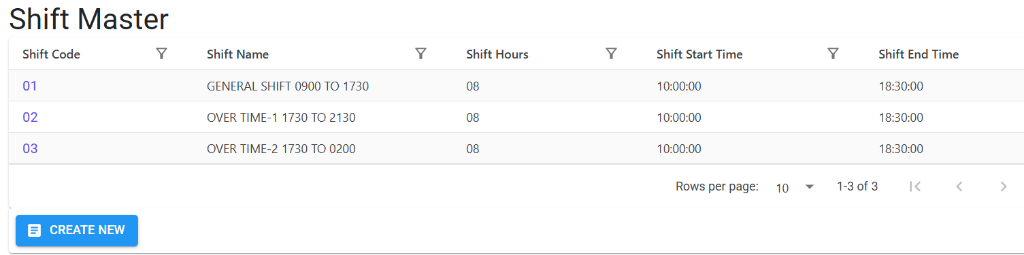
The Index Page displays all pre-configured working shifts. It provides a quick summary of the shift code, name, total hours, and start/end times.
Shift Details
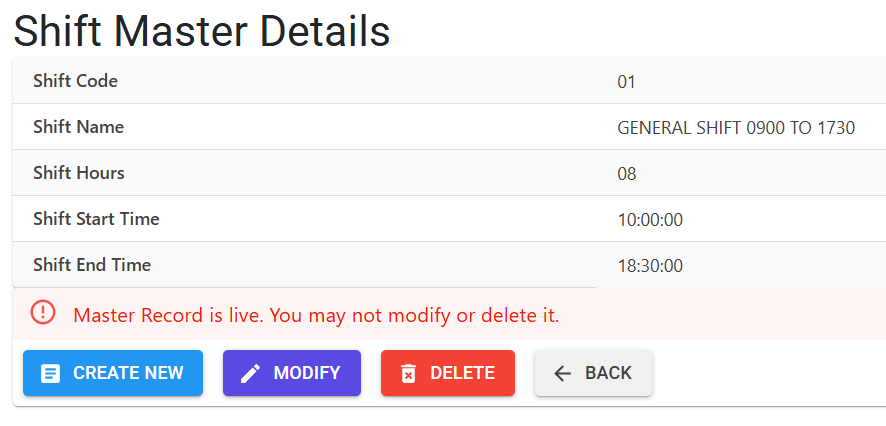
Clicking on a shift code opens the Details View. This page shows the exact configuration of the shift.
- Active Protections: If a shift is currently in use by employees or production records, the system identifies it as a Live Record. To maintain data integrity, the system will block any attempts to modify or delete these active shifts.
- Management: For new or unused shifts, you can use the action buttons to Modify, Delete, or Create New entries.
3. Key Features ✨
🏷️ Auto-Coding
The system automatically generates a unique 2-character Shift Code (e.g., ‘01’, ‘02’) for each entry. This code is used as the link across all production and payroll modules.
🛡️ System Capacity
To keep the UI and reports efficient, the system supports a maximum of 99 unique shift definitions.
4. Usage Across Modules & Transactions 🔄
The Shift Master is a required field in two primary areas of the ERP:
⚙️ Manufacturing Output (IIRS)
The Internal Inspection Release Sheet (IIRS) tracks every production batch by its respective shift. This allows the factory manager to identify which shift produced specific items, which is critical for:
- Traceability in case of quality issues.
- Calculating actual output versus targets.
👥 Human Resources (Employee Master)
Every employee is assigned to a default shift within their Employee Master profile. This link is used for:
- Attendance tracking.
- Overtime (OT) calculations.
- Departmental manpower planning.
5. Related Reports 📊
📉 Shift-wise Production Report
The most important report for plant managers. it compares the quantity and quality of output across all shifts (e.g., Morning shift vs. Night shift) to identify performance gaps.
👥 Manpower Allocation
A report that shows the distribution of the workforce across different shifts, helping HR ensure that all operational windows are adequately staffed.
⚡ Machine Efficiency by Shift
By linking shifts to machine logs, the system can calculate the downtime and utilization percentage of your equipment during specific working hours.
6. Guidelines and Logic ⚠️
Entry Standards
- Standard Naming: The system automatically converts all names to UPPERCASE (e.g., “night” becomes “NIGHT”) to ensure consistent reporting.
- Time Logic: Ensure that the “Shift Hours” duration correctly matches the difference between the Start and End times to avoid payroll discrepancies.
7. Deletion & Modification Preventions 🛡️
To maintain the accuracy of your historical production and labor data, the system enforces strict protection rules:
🚫 Deletion Preventions
You cannot delete a Shift if:
- One or more Employees are currently assigned to it.
- It has been used in even a single Production (IIRS) record. If you try to delete a shift that is in use, the system will prevent the action and show you a count of the active records linked to it.
✏️ Modification Rules
- Code Stability: The Shift Code is permanent once saved and cannot be changed.
- Time Updates: While you can update the Start/End times, be aware that this may impact how future attendance is calculated for employees assigned to that shift.
8. Best Practices / Tips 💡
- Consistent Formatting: Use a standard naming convention like “SHIFT-1”, “SHIFT-2” to make reports easy to scan.
- Include Break Logic: If your shifts include mandatory breaks, ensure the “Shift Hours” reflect the actual working time for more accurate productivity metrics.
- Review Periodically: If your facility changes its working hours seasonally, remember to update the Shift Master to ensure production reports remain accurate.