Advance License (Export-Import)
Advance License Module - User Guide
1. Introduction 📝
The Advance License module is designed for export-oriented units that benefit from duty-free imports of raw materials. It manages the full lifecycle of an Advance Authorization (License)—from initial application to the fulfillment of Export Obligations (EO). The module ensures that every gram of imported material is accurately mapped to an exported finished product, maintaining a clear audit trail for customs and DGFT compliance.
ℹ️
In the overall business flow:
- Records the License Application and subsequent License Number (Authorization).
- Sets Export Obligations (Products to be exported) and Import Entitlements (Raw materials allowed).
- Links Sales Orders to the License (FOB commitment).
- Links Purchase Indents / GRNs to the License (CIF consumption).
Typically, this module is used by Export-Import (EXIM) Managers, Logistics Leads, and Finance Officers.
2. Getting Started with Advance License 🚀
Accessing the Module
Navigate to the Advance License Index. The module is divided into Application Management, Order Linking, and Indent Linking.
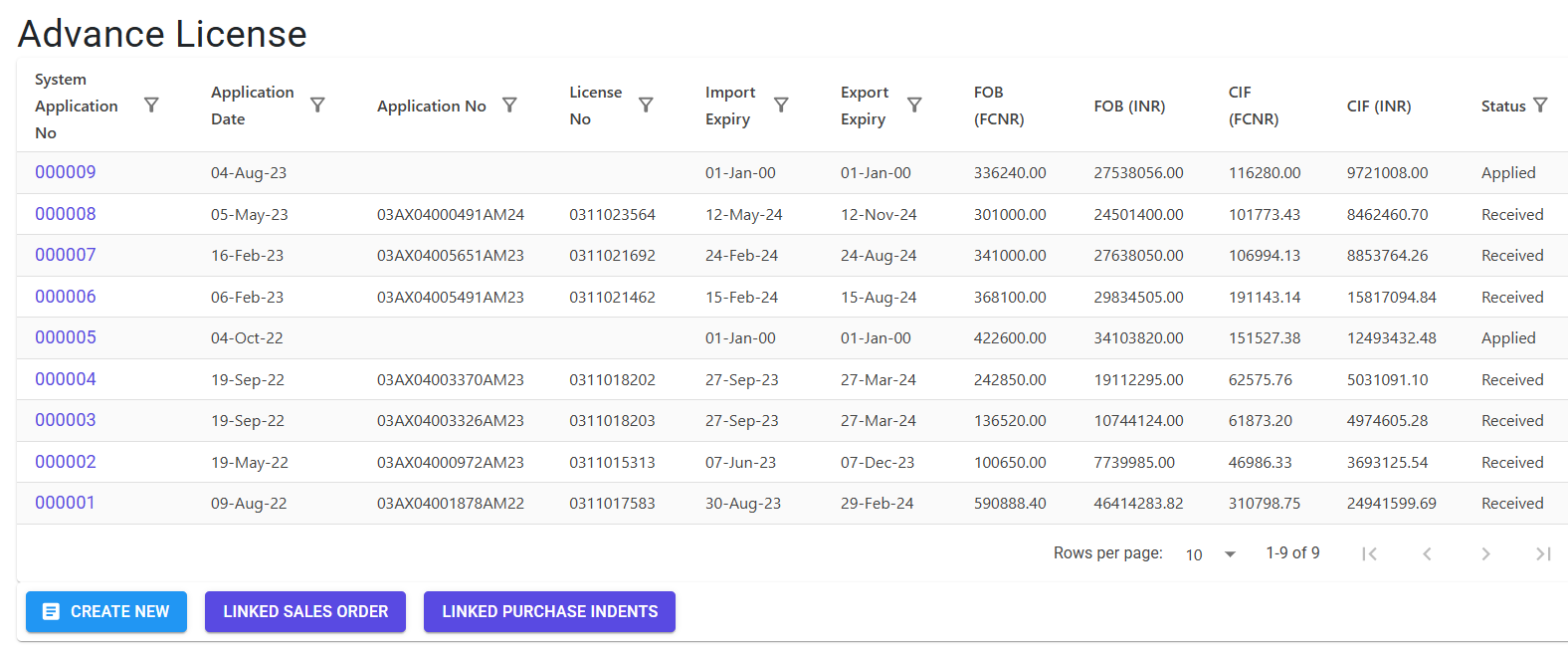
Core Components
- Application (Header): Tracks the License No, Dates (Issue, Import Expiry, Export Expiry), and overarching Currencies.
- License Items (Lines): Defines the specific Items allowed for Import (I) and the target products for Export (E).
- Consumption Logic: Maps which raw materials (Import) are required for which finished products (Export) using Ref Export Item mapping.
3. Features & Benefits ✨
💰 Automated Financial Tracking
- FOB & CIF Computation: The system automatically calculates the FOB (Free on Board) value for exports and CIF (Cost, Insurance, and Freight) for imports.
- Freight & Insurance Pros: Configure standard percentage rates (e.g., 10% Freight, 1% Insurance) to auto-calculate assessable values in both INR and Foreign Currency.
🔗 Dynamic Linkage System
- Order Linking: Link confirmed Sales Orders to an Advance License to “block” the export obligation.
- Indent Linking: Link procurement indents to a License to ensure materials are imported duty-free specifically for the authorized application.
- Balance Management: Real-time tracking of
AL Balance Qtyvs.Order/Indent Balance Qtyto prevent over-linking.
📊 Regulatory Compliance
- Consumption Reports: Generates detailed reports showing the Consumption Ratio and fulfillment status of the license.
- Expiry Monitoring: tracks Import and Export expiry dates independently to ensure the license doesn’t lapse without utilization.
4. Complete Flow 🔄
Submit Application
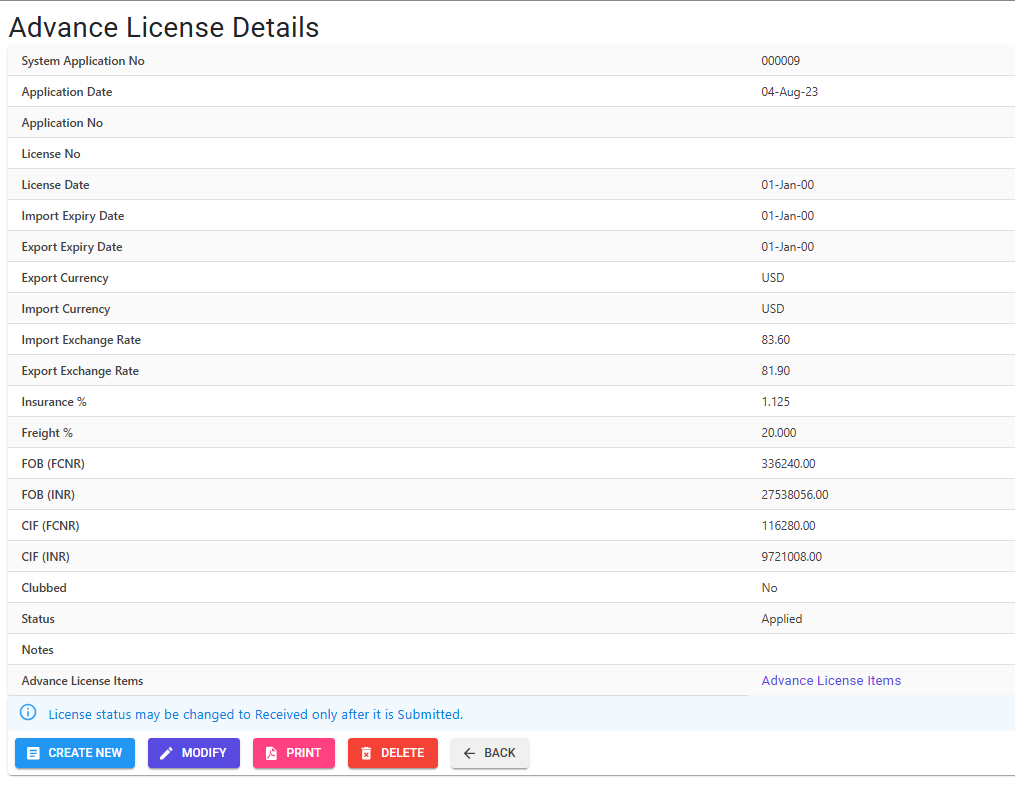
- Define the Application No and Date.
- Set the Import Currency and Export Currency (with current Exchange Rates).
- Define Freight and Insurance percentages.
Define Entitlements & Obligations
- Add Export Items (E): Define the items you commit to export, their quantity, and expected rate.
- Add Import Items (I): Define the raw materials needed. Each import line must link to a Ref Export Item to establish the “input-output” relationship.
Link Operational Documents
- Navigate to Link License to Order to map your Sales pipeline to the Export Obligation.
- Navigate to Link License to Indent to map your Procurement to the Import Entitlement.
Monitor & Update
- Once the physical license is received, update the License No and Issue Date.
- Use the Compute FOB/CIF action to refresh financial valuations after any quantity changes.
5. Validations and Logic ⚠️
Main-Level (Header) Validations
- Chronological Date Logic:
- License Date must be later than the Application Date.
- Import Expiry must be after the License Date.
- Export Expiry must be after the Import Expiry.
- Status Management: Updating the status to “Serial No Generated” (
S) triggers an automatic sequence assignment for documentation.
Line-Level (Item) Validations
- Pricing Safety:
- Rates must be at least 0.0050 to be valid.
- If
IsManualRateis ‘N’, the system strictly fetches rates from the Price Master based on Item, Party, Brand, and Currency.
- Item Role Integrity:
- An item cannot be used as both an Export item and an Import item in the same application.
- Duplicate Export items are prohibited within a single application.
- Requirement Mapping: Every Import item must have a
RefExportItemIdselected to prove its necessity for the export product.
Linking Validations
- Quantity Caps: You cannot link an Order or Indent quantity that exceeds the Available Balance in the Advance License.
- FOB/CIF Auto-Compute: Every time a line is added or deleted, the system re-triggers the
ComputeFobCifstored procedure to ensure financial accuracy.
6. Related Reports 📊
- 📑 Advance License Application Report: Detailed breakdown of items, HSN codes, rates, exchange rates, and Assessable Values.
- 🍽️ Consumption Report: The critical report for DGFT audits. It shows:
- Consumption Ratio: How much raw material is consumed per unit of finished good.
- Total Amount: Values in Foreign Currency for both obligations and entitlements.
- 📈 Linkage Index: Provides a summary of which Sales Orders and Indents are currently “riding” on the license.
7. Best Practices / Tips 💡
- Manual Rate Override: If a specific license was negotiated at a non-standard rate, enable Is Manual Rate to bypass the Price Master.
- Ref Export Item mapping: Be extremely careful when linking Import items to Export items. This mapping is what the Consumption Ratio uses to calculate if you have fulfilled your duty-free obligation.
- Currency Fluctuations: If exchange rates change significantly before the license is issued, update the header Rates and trigger Compute FOB/CIF to see the true INR liability.