Daily Production
Daily Production Module - User Guide
1. Introduction 📝
The Daily Production module is the execution heartbeat of the manufacturing floor. It bridges the high-level Production Plan with the granular daily reality of the factory. It allows plant managers to set daily shift targets, record real-time output, track labor efficiency, and monitor production downtime.
ℹ️
In the overall business flow:
- References the active Production Plan to set daily item targets.
- Captures Actual Output (Good Qty) vs. Time-Out Qty (Loss/Delayed Qty).
- Provides data for Labor Productivity and Financial Performance analysis.
Typically, this module is used by Shift Supervisors, Floor Managers, and Production Clerks.
2. Getting Started with Daily Production 🚀
Accessing the Module
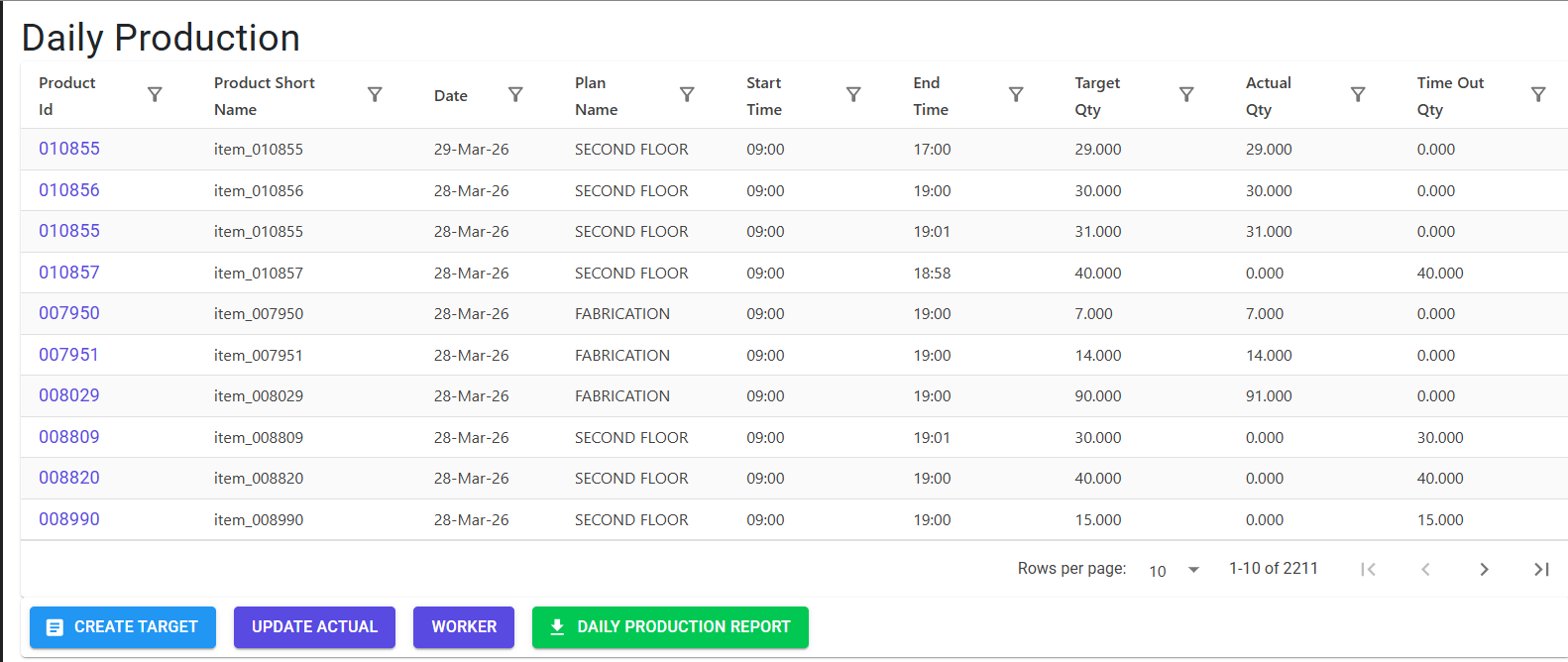
Navigate to Daily Production via the Manufacturing menu. The index is partitioned into Targets (Set by Supervisors) and Actuals (Recorded by Line Operators).
Key Workflows
- Setting Daily Targets: Define which products will run on which Plan/Date, including the specific time slot and targeted worker count.
- Updating Actuals: Line operators or supervisors update the “Actual Qty” achieved against the set target.
- Worker Management: Track the number of workers assigned to a specific floor plan for a given date to calculate “Output per Man-Hour”.
3. Features & Benefits ✨
🎯 Targeted Shift Planning
- Time Slot Management: Define production windows (Shift starts/ends). The system enforces a mandatory duration between 1 to 12 hours per entry.
- Live Target Tracking: View real-time progress of “Target vs. Actual” throughout the shift.
👷 Labor Efficiency Tracking
- Worker Allocation: Record the total number of workers assigned to a specific floor plan. This data is critical for calculating labor cost per unit produced.
- Automatic Worker Record: Creating a production target automatically initializes a worker record for that date to ensure no data is missed.
⚡ Performance & Value Analysis
- Financial Visibility: Reports automatically calculate the Actual Value (Actual Qty × Rate) and Target Value (Target Qty × Rate) to evaluate floor performance in monetary terms.
- Percentage Completion: Instant visibility into the completion percentage (
Actual Qty / Target Qty %) for every item.
4. Complete Flow 🔄
Set Daily Target
- Select the Floor Plan and Date.
- Choose the Product (must be active for that target date).
- Define the From/To Time.
- Set the Target Qty and optional Notes.
Allocate Labor
- Navigate to the Worker Index.
- Update the No. of Workers for the respective Plan and Date.
Record Actual Production
- Locate the active target in the Actual Production Index.
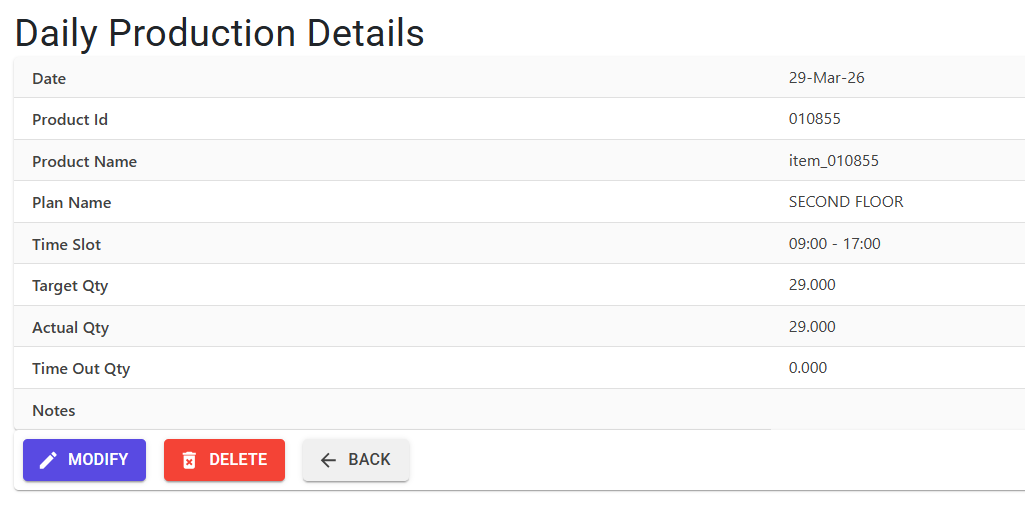
- Update the Actual Qty (for units produced) or Time Out Qty (for units delayed/lost).
- The system supports both Manual Entry (typing a fixed qty) and Incremental Entry (adding to previous count).
5. Validations and Logic ⚠️
Main-Level (Header/Target) Validations
- No Prior Dating: Targets cannot be set for dates prior to today’s date.
- Shift Duration: The interval between ‘From Time’ and ‘To Time’ must be between 60 minutes and 720 minutes (1–12 hours).
- Unique Daily Targets: The same exact Item ID cannot be specified twice for the same Plan and Date.
Recording Validations
- Target Existence: You cannot record “Actual” production for an item that was not first defined in the “Daily Target”.
- Manual vs. Auto: If an entry is marked as
IsManual = N, the system defaults to incrementing the count by 1 (ideal for QR/Scanner-based recording). IfY, the user must explicitly type a quantity > 0.
6. Master Data Dependencies 📚
- Production Plan: Provides the “Plan Codes” and overall item targets that the daily entries reference.
- Item Master: All products produced must be valid, active items.
- MFG Log: Tracks every deletion and update for audit trails.
7. Related Reports 📊
- 📊 Daily Production Report: The primary summary report. It includes:
- Actual Qty vs. Target Qty vs. Time Out Qty.
- Calculated Percentage (%) of achievement.
- Actual Value vs. Target Value (Monetary performance).
- Total Qty (Actual + Time Out) across specific date ranges.
- 👷 Labor Analysis: Integrated within the production report to show “No. of Workers” alongside output metrics.
8. Best Practices / Tips 💡
- Use ‘Time Out Qty’ for Blockages: If production was halted due to machine failure or power cut, record the potential units lost in “Time Out Qty” to maintain a true record of floor capacity.
- Real-time Worker Updates: Ensure worker counts are updated at the start of the shift. Accurate labor data is the only way to calculate “Throughput per Worker”.
- Notes for Deviations: If a target wasn’t met (percentage < 80%), use the Update Notes feature to explain the cause (e.g., “Shortage of Raw Material”).