Marketing Activity
Marketing Activity Module - User Guide
1. Introduction 📝
The Marketing Activity module serves as a lightweight CRM (Customer Relationship Management) tool tailored for manufacturing sales teams. It allows for the systematic recording of every “touchpoint” with a customer or prospective lead, ensuring that commitments, follow-ups, and product interests are never lost.
In the overall business flow:
- It captures pre-sales interactions that lead to enquiries and orders.
- It tracks Executive performance and client engagement levels.
- It links specific discussions to Product Groups for targeted marketing analysis.
Typically, this module is used by Sales Executives, Marketing Managers, and Business Development Teams.
2. Getting Started with Marketing Activity 🚀
Accessing the Module
Navigate to the Marketing Activity Index section via the main menu.
The Module Structure
The module consists of three interconnected areas:
- Activities: The main transactional records.
- Activity Master: Defines what kind of interaction occurred (e.g., Cold Call, Exhibition, Follow-up).
- Interaction Type: Defines how it occurred (e.g., Phone Call, Email, In-person Meeting).
Navigation
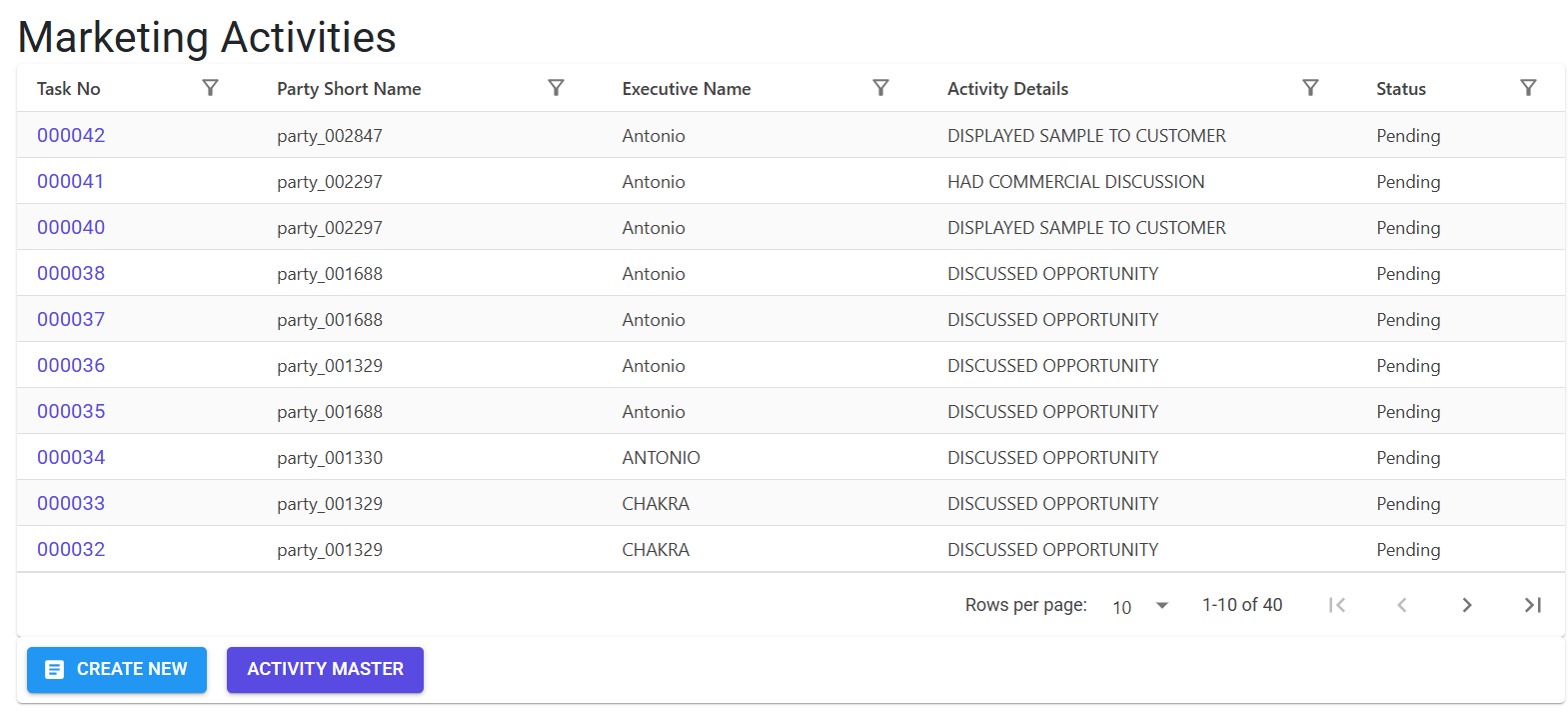
The main index provides a birds-eye view of all tasks, showing the Task No, Party, Executive assigned, and the current Status.
3. Features ✨
The Marketing Activity module is built for speed and precision:
- ⏱️ Precise Time Tracking: Records the exact Start and End date/time of each activity to measure interaction duration.
- 📦 Product-Linked Conversations: Directly link activities to specific Product Groups and Items to track which products are driving interest.
- 👤 Executive Assignment: Assign tasks to specific sales personnel and track their individual activity logs.
- 📊 Categorization Masters: Fully customizable Activity and Interaction types to match your company’s sales process.
- 🔍 Smart Autocomplete: Quick-search functionality for Parties and Items using
MudAutocompleteto minimize manual typing. - 🔐 Role-Based Security: Ensures that only authorized users can view, modify, or delete sensitive interaction logs.
- 📜 Automated Audit Trail: Every add, edit, or delete action is automatically logged in the
MFGLogfor management review.
4. Complete Flow 🔄
Mapping an interaction from start to finish:
Configure Setup (One-time)
- Ensure your Activity Master and Interaction Types are populated with relevant categories (e.g., “Client Visit”, “Demo”).
- Confirm your Sales Executives are listed in the user master.
Record an Activity
- Click “Create New” in the Marketing Activity index.
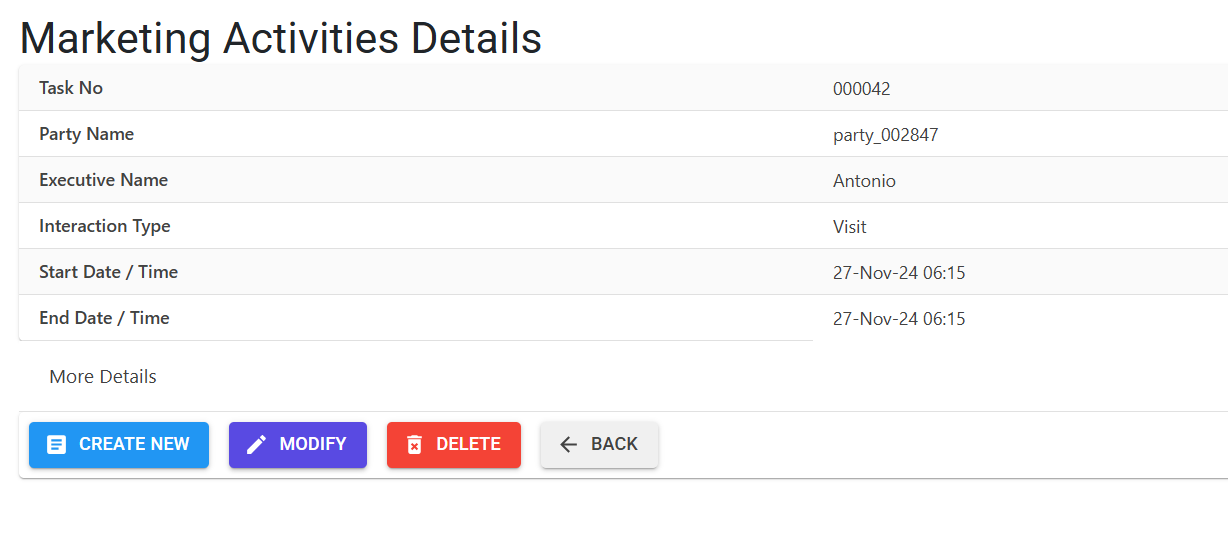
- Select the Party (Customer/Lead).
- Choose the Executive who performed the activity.
- Pick the Activity Details (from Activity Master).
- Set the Start and End date/time.
Link Product Interest
- Select the Product Group (ItemGroup) being discussed.
- Select the specific Product Name (Item) and enter a predicted Quantity if a lead is generated.
Add Details & Status
- Enter Notes for the conversation summary.
- Set the current Status and define any Next Steps or Next Scheduled interaction dates.
5. Validations and Error Handling ⚠️
The system ensures high-quality data through the following rules:
| Validation Type | What is checked? | Error Message / Action |
|---|---|---|
| Chronological Logic | End Date/Time vs Start Date/Time. | “End Date / Time must be after Start Date / Time.” |
| Duration Check | Zero-length activities. | “Start Date / Time and End Date / Time cannot be same.” |
| Mandatory Masters | Missing Party, Activity, Group, or Executive. | Highlights: “Needs to be selected.” |
| Table Limits | Capacity of the Activity Master. | “This table can hold a maximum of 99 records only.” |
| Duplicate Check | Adding the same Interaction Type name. | “Interaction Type Name already exists.” |
| Field Length | Notes and Name constraints. | “Notes can be upto 300 characters only.” |
6. Tools / Smart Features 🔧
- 📁 Delete Count Utility: Before deleting a Master record (like an Interaction Type), the system checks if it is being used in any existing activities to prevent data corruption.
- 🏷️ Status Management: Custom statuses to track the lifecycle of a marketing task from “Open” to “Completed” or “Deferred”.
7. Related Reports 📊
- 📈 Marketing Performance Report: Analyze executive productivity and engagement trends.
- 🔍 CRM Lead Analysis: Detailed breakdown of leads generated by marketing activity (via Crm Lead Report Option).
8. Configuration Requirements ⚙️
- 👥 Party Master: Customers or potential leads must exist in the system.
- 🛍️ Item Group & Item Masters: Products must be configured to link them to marketing interest.
- 👨💼 Executive Master: List of sales team members must be defined.
9. Best Practices / Tips 💡
- Consistent Statuses: Stick to a standard set of statuses so that the “Marketing Analysis Report” provides accurate funnel data.
- Immediate Entry: Record interactions as soon as they happen to ensure “Notes” are accurate and next-step reminders are set correctly.
- Use Activity Masters: Avoid creating too many generic activities; use specific categories like “Trade Show Follow-up” for better filtering.
10. Technical Observations 🔍
- Master Deletion: You cannot delete an Activity or Interaction Type if it is already referenced in a saved Marketing Activity.
- Time Sensitivity: The system uses the server’s time zone for defaults; ensure your users are aware of this if they work across time zones.