Currency Master
Currency Master - User Guide
1. Introduction 📝
The Currency Master is a cornerstone of the system’s financial architecture. It defines the different types of money recognized by the ERP for both domestic and international trade. Each currency record includes critical information such as the unique code, symbol, and the names of the whole and fractional units (e.g., “Rupees” and “Paise”).
Strategic Role of Currency Master:
- Multi-Currency Support: Enables the company to issue quotes and invoices in Dollars (USD), Euros (EUR), etc.
- Document Conversion: Provides the unit names for “Amount in Words” conversion on all legal documents.
- Financial Reporting: Forms the basis for tracking foreign exchange transactions and outstanding balances.
2. Getting Started 🚀
Accessing the Module
The Currency Master is located in the Supply Chain Setup or Finance Master section.
The Index Page
The Index Page displays a comprehensive list of all currencies supported by the system. Each entry shows the standard international code, full currency name, main/sub-unit descriptors, and the visual symbol.
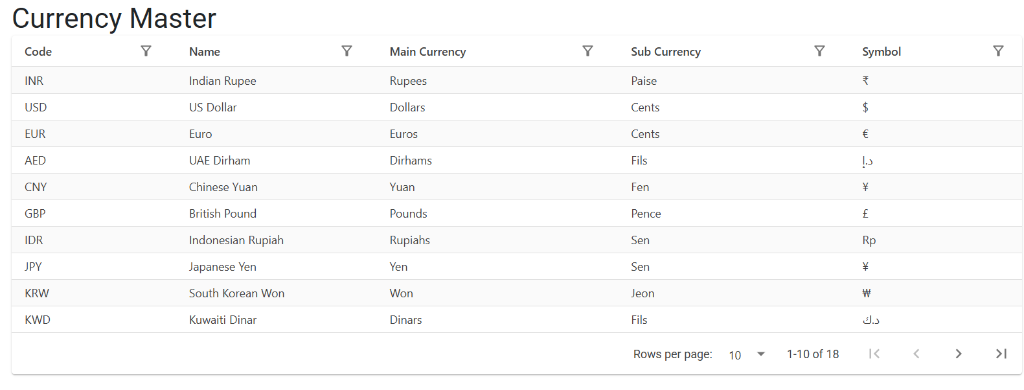
Operational Mode: System-Locked Data
Unlike other masters, the Currency Master is typically Read-Only for most users. Because currencies are linked to virtually every transaction in the system, they are pre-configured during system setup to ensure regional and financial compliance.
3. Key Features ✨
🔠 Currency Descriptors
Each currency is defined by:
- Currency Code: The standard 3-letter identifier (e.g., INR, USD, GBP).
- Main & Sub-Currency Names: Used for text generation. For example, USD is defined with “Dollars” and “Cents”.
- Symbol: The visual representation (₹, $, £) used in reports and cheque printing.
💰 FCNR Tracking
For transactions involving foreign currencies (any currency other than your book currency, like INR), the system enables Foreign Currency Non-Resident (FCNR) tracking. This allows the business to see the amount in both the foreign value and the converted local book value.
4. Usage Across the ERP 🔄
The Currency Master is used in every module that involves a financial value:
📄 Sales & Purchase Transactions
- Sales Orders & Invoices: Determining the billing currency for the customer.
- Purchase Bills: Recording the cost of goods from international or domestic vendors.
- Quotations: Presenting prices in the customer’s preferred currency.
💳 Finance & Banking
- Vouchers: Receipt and Payment vouchers use the currency to determine how to post to the ledger.
- Cheque Printing: Automatically pulls the currency symbol and unit names for printing on bank cheques.
- Debit/Credit Notes: For making financial adjustments in the original currency of the invoice.
5. Related Reports 📊
🏛️ Outstanding Reports (AR/AP)
Displays unpaid balances grouped by currency, allowing the finance team to manage exchange rate risks and foreign collections.
📝 Sales & Purchase Registers
Comprehensive reports that list all transactions, often featuring a column for the currency and the exchange rate used at the time of the transaction.
🧾 Legal & Tax Reporting
While transactions happen in multiple currencies, reports like GST Registers use the currency mapping to ensure values are correctly represented in the local book currency for government compliance.
6. Guidelines and Logic ⚠️
Data Standards
- Code Length: Currency codes are strictly limited to 3 characters to follow global ISO standards.
- Amount to Words: To ensure accuracy, the system requires both parts of the currency (e.g., “Dollars” and “Cents”) to be correctly spelled to generate professional invoices.
7. Data Protection & Preventions 🛡️
To prevent catastrophic errors in the company’s financial books, the following protections are in place:
🚫 Deletion Proventions
Deletion of a currency is Strictly Prohibited once the system is live. Because every invoice, voucher, and ledger entry is linked to a currency code, deleting a master record would “orphan” those transactions, making it impossible to generate financial statements or balance sheets.
✏️ Modification Preventions
- Code Immutability: The 3-letter Currency Code cannot be changed after creation.
- Locked Interface: The standard user interface often disables the “Create” and “Delete” buttons for this master, requiring administrative or developer-level access for any core changes.
8. Best Practices / Tips 💡
- Symbol Accuracy: Ensure the symbols are correct as they directly impact the professional look of your printed Invoices and Cheques.
- FCNR Review: Always check the “Equivalent Amount” in your local currency when processing foreign Vouchers to ensure the exchange rate was applied correctly.
- Text Generation: If your “Amount in Words” looks incorrect on a PDF, check the Main/Sub-Currency fields in the Currency Master for typos.