Standard Instruction Master
Standard Instruction Master (StdInsMst) - User Guide
1. Introduction 📝
The Standard Instruction Master (StdInsMst) serves as a centralized repository for managing reusable text, terms and conditions, and email body templates across the ERP system. It allows users to define specific sets of instructions or notes for different document types (like Sales Orders, Invoices, and Indents) without having to re-type them manually each time.
In the overall business flow:
- It provides Standardized Terms for printouts and reports.
- It acts as the Email Content Source for automated dispatch and notification jobs.
- It enables Proposal Templates for CRM Leads and Quotations.
Typically, this module is used by System Administrators and Module Heads to ensure consistency in communication.
2. Getting Started with Standard Instructions 🚀
Accessing the Module
Navigate to the Standard Instruction Index via the Supply Chain or CRM menu. Depending on the context, it may appear as:
- Standard Instruction: For general module notes (Indents, Orders, Invoices).
- Proposal Template: For CRM-specific proposal content.
The Index Page
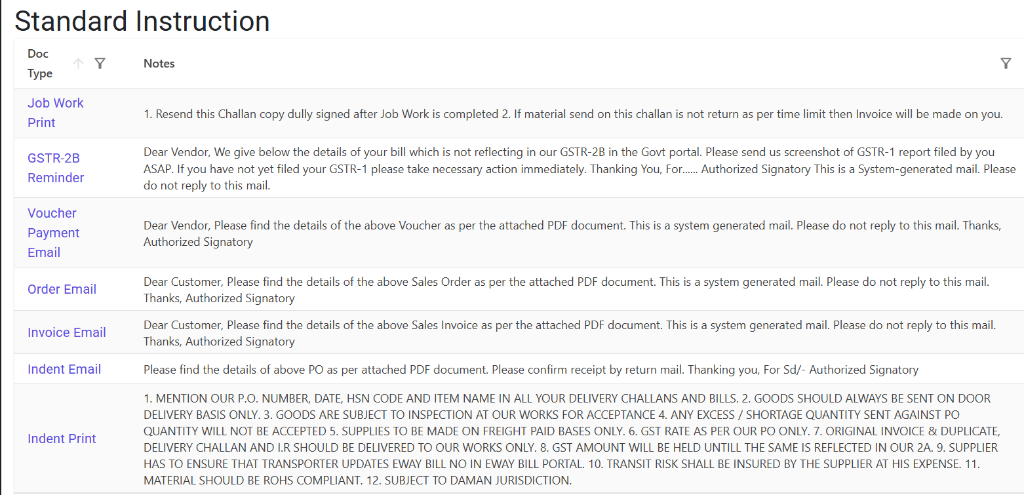
The Index Page provides a bird’s-eye view of all configured instructions. Here, you can quickly identify which document types have mapped notes and preview their content.
Creating/Modifying Instructions
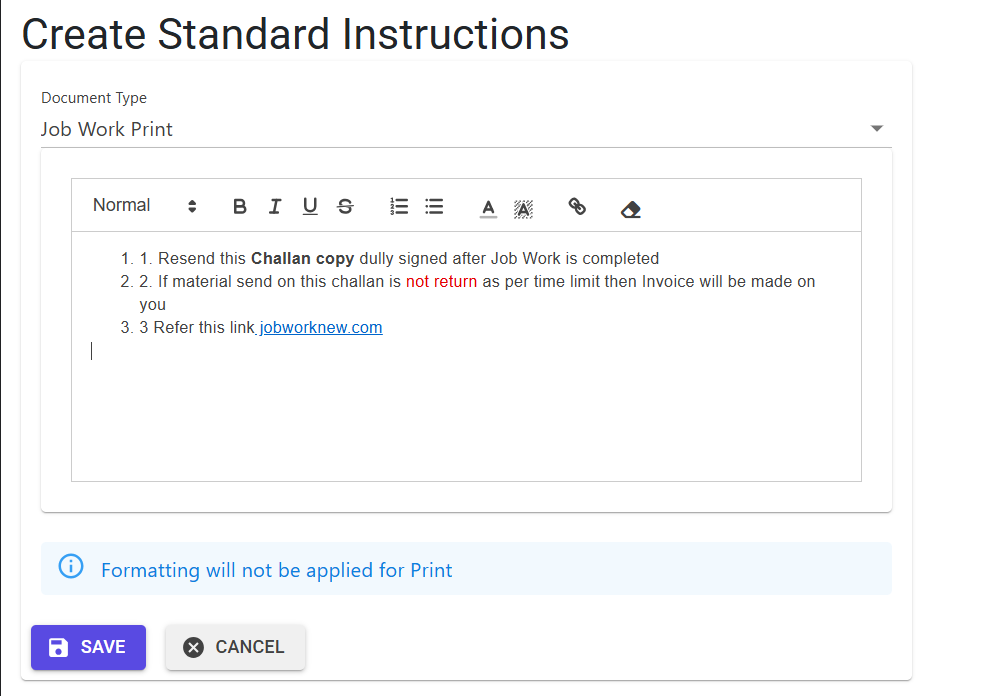
To manage instructions, the system provides a straightforward interface:
- Create New: Define a new instruction set for a document type. The system ensures only one set exists per document type.
- Rich Text Styling: Use the built-in editor to apply bold, italics, or links to your notes. Note that formatting may be stripped for specific PDF printouts as noted in the UI.
3. Features ✨
📝 HTML Rich-Text Support
- Formatted Notes: Store instructions with basic HTML formatting (bold, links, breaks) to ensure they look professional in emails and PDF reports.
- Automatic Cleanup: The system automatically converts line breaks (
\r\n) to HTML<br>tags when processing for emails.
🔗 Link Validation
- Security First: Any links included in the notes are validated to ensure they use secure or standard prefixes (
https://,mailto:, ortel:).
🏷️ Multi-Module Integration
- Document Type Mapping: Each instruction is linked to a specific DocType code, ensuring that the Correct notes are pulled for the Correct document (e.g., Sales Order vs. Purchase Bill).
4. Complete Flow 🔄
Define Document Type
- Select the Document Type (e.g., Sales Order, Invoice, Voucher).
- The system prevents duplicate entries for the same document type to maintain a “Single Source of Truth.”
Compose Instructions
- Enter the Notes or Terms.
- Use the built-in editor to format text.
- Ensure total character count is within limits (4000 for HTML, 2000 for plain text).
Consumption by Modules
- Email Jobs: Automated jobs fetch these notes to populate the
emailmessagefield. - Reports/Printouts: Repositories fetch these notes to include them as “Standard Instructions” at the footer of PDFs.
- UI Pages: Details pages (like
Indent Details) pull these notes for display and user review.
5. Validations and Logic ⚠️
The system enforces strict data integrity rules during the creation and modification of instructions.
Entry Validations
- Duplicate Check: When creating a new instruction, the system checks the
stdinstructionstable. If an entry already exists for the selectedDocType, creation is blocked. - Content Length:
- Plain Text: Must not exceed 2000 characters (excluding HTML tags).
- Raw Content: Must not exceed 4000 characters (including HTML tags and formatting).
- Mandatory Field: The
Notesfield cannot be left empty.
URL/Link Integrity
To prevent phishing or broken links, all <a> tags in the notes must:
- Start with
https://for external web links. - Start with
mailto:for email addresses. - Start with
tel:for phone numbers.
6. Module Mappings (DocTypes) 🛡️
Standard instructions are partitioned by DocType codes. Common mappings include:
| Module / Document Type | Primary Usage |
|---|---|
| Indent | Automated Indent approval emails |
| Sales Invoice | Dispatch Advice / Invoice emails |
| Sales Order | Order Confirmation emails |
| Purchase Bill | Terms & Conditions on Bills |
| Job Work | Job Order instructions |
| Voucher Payment | Payment advice emails |
| Voucher Receipt | Receipt acknowledgement emails |
| CRM Proposal | Lead Quotation templates |
7. Automated Email Jobs 📊
These instructions are the “voice” of the ERP’s automated communication system:
- 📧 Ar Email: Sends outstanding payment reminders using instructions under DocType.
- 📧 Invoice Email: Uses DocType to send PDFs and tracking info to customers.
- 📧 Voucher Payment Email: Uses DocType to notify vendors of processed payments.
- 📧 SalesOrder Email: Uses DocType to confirm order receipt and terms.
8. Best Practices / Tips 💡
- Keep it Concise: While 4000 characters are allowed, extremely long instructions may lead to cluttered email layouts.
- Verify Links: Always test your
https://links in a browser before saving them in a template. - Check Module Integration: If you update the notes for DocType Sales Order, preview a Sales Order email to ensure the formatting matches your expectations.
- One Note Per Type: You cannot have multiple instruction sets for the same DocType. Use a single comprehensive note for all scenarios within that module.