Carry Forward Stock
Carry Forward Stock Module - User Guide
1. Introduction 📝
The Carry Forward Stock module is a critical year-end utility used to migrate inventory balances from the closing of one fiscal year to the opening of the next. It ensures that the final stock levels (Closing Balance) are accurately established as the starting point (Opening Balance) for the new financial period.
Business Purpose:
- Automates the transition of stock from the current year to the next.
- Synchronizes inventory valuation (Weighted Average) during the migration.
- Maintains stock continuity across the organization’s history.
2. Year-End Transition 🗓️
🔄 Stock Continuity Logic
The system identifies all closing stock entries in the “Carry Forward From” year (e.g., 2023-24) and creates corresponding opening entries in the “Carry Forward To” year (e.g., 2024-25).
- Source: Closing Physical Count or Store Inventory.
- Target: Opening Inventory Balance.
📅 Automatic Year Mapping
The system automatically calculates the target year by incrementing the source year label, ensuring 100% accuracy in fiscal year pairing.
3. Valuation & Item States 🧪
📈 Weighted Average Rate Integration
When carrying forward Store Inventory (“S”), the system automatically triggers a Weighted Average Rate Report for all active business units.
- Action: This ensures that the opening rate in the new year is a true reflection of the weighted historical costs.
- Calculation: Total Stock Value / Total Stock Quantity.
🛠️ Rejected Stock Treatment
For items in the Rejected (“R”) state, users can define a Percentage for Rejected Item (defaulting to 100%). This allows for financial adjustments or write-downs of damaged/rejected stock during the year-end rollover if necessary.
4. Operational Safeguards 🛡️
The system includes several “Hard Guards” to prevent data corruption during migration:
🔒 Book Closure Lock
The system checks the status of the target year’s accounts.
- Rule: If the books for the target year (e.g.,
24-25) are already closed, the system will block the Carry Forward action with the message: “You may not create/modify/delete records as books are closed for this year.”
⚠️ Negative Stock Warning
Before confirming the migration, the system scans the closing inventory for negative quantities.
- Notification: If negative stock is found, a warning message is displayed: “One or more closing inventory items are negative. System will proceed and carry forward negative qty to next year.”
- Best Practice: Users are advised to rectify negative balances in the source year before final migration.
🚩 Redo Detection
If a Carry Forward has already been performed for the target year, the system issues a critical warning:
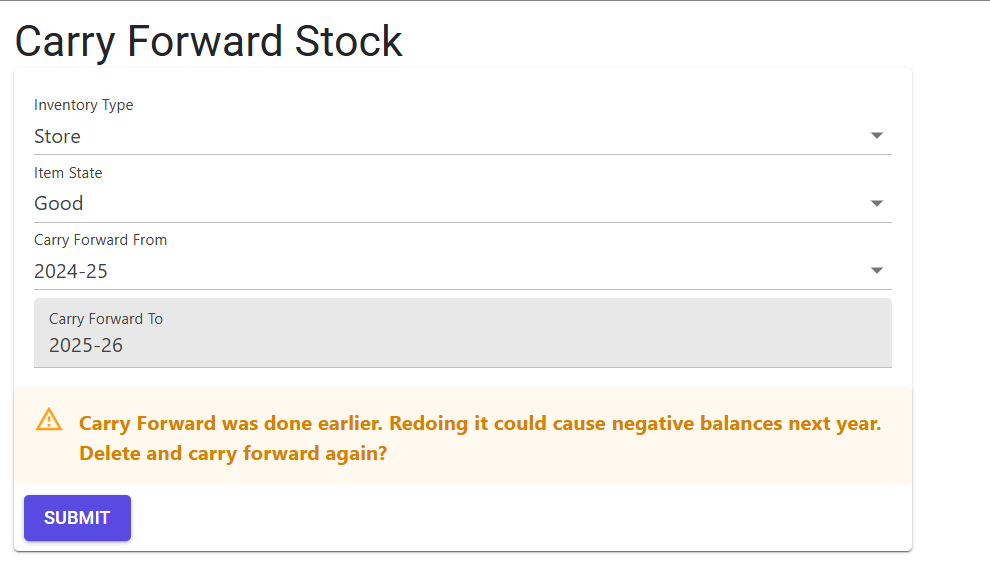
- “Carry Forward was done earlier. Redoing it could cause negative balances next year. Delete and carry forward again?”
- Purpose: Prevents duplicate opening entries that would double the starting stock levels.
5. Complete Workflow 🔄
Select Parameters
Navigate to Carry Forward Stock. Choose the Inventory Type (Store or Physical) and the Item State.
Verify Source Year
Select the Carry Forward From year. The system will automatically populate the Carry Forward To field and check for previous migration records.
Check Negative Stock
The system will display a count of negative stock lines. Review these and decide whether to proceed or rectify.
Confirm & Execute
Click Submit. The system will:
- Clear existing opening records for the target year (if authorized).
- Run the Weighted Average Valuation for all units (for Store stock).
- Migrate all closing quantities to the new year as opening balances.
6. Best Practices / Tips 💡
- Rectify Negatives: Always generate an Inventory Ledger to identify and fix negative quantities before performing the final Carry Forward.
- Accounting Sync: Ensure that the Carry Forward Accounts process is performed in conjunction with the Stock migration to keep the General Ledger and Inventory in sync.
- Backup: As a precaution, always ensure a full database backup is confirmed before initiating year-end rollover operations.