Debit / Credit Notes (DNCN)
Debit / Credit Note (DNCN) Module - User Guide
1. Introduction 📝
The Debit / Credit Note (DNCN) module handles post-invoice adjustments for both purchases and sales. Whether it’s a price correction, a material return, or a tax adjustment, this module ensures that financial and inventory balances accurately reflect the final settled transaction.
Business Impact:
- Facilitates Sales Returns (SCN) and Purchase Returns (PDN).
- Manages Price Corrections (Debit or Credit) after an invoice is finalized.
- Synchronizes Physical Stock with financial credits/debits.
- Generates E-Invoices (E-DNCN) for legal GST compliance.
2. Getting Started with DNCN 🚀
Accessing the Module
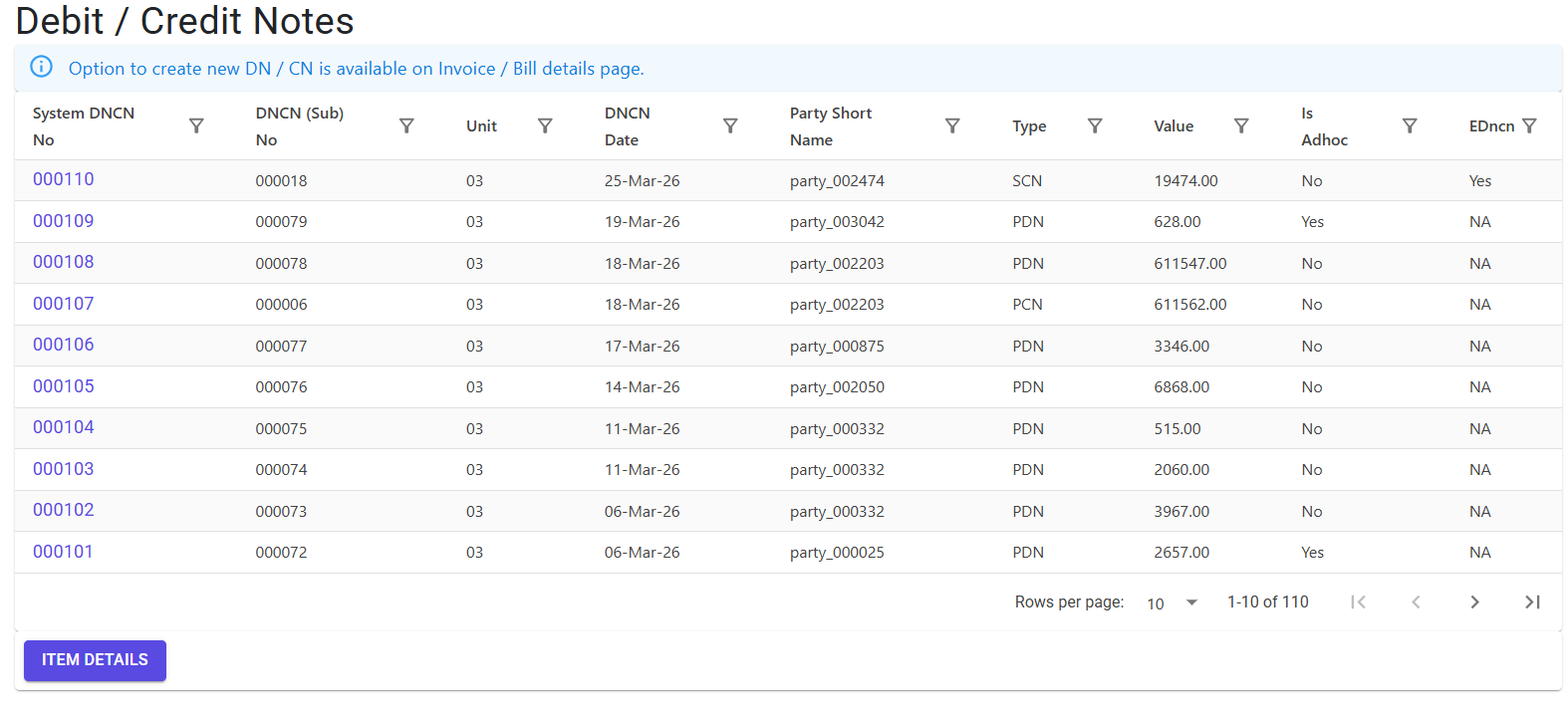
Navigate to the Debit/Credit Note Index via the Procurement or Sales menu.
Document Types & Scope 📂
The system uses a 4-category classification for all notes:
| Type | Name | Purpose | Side | Financial Impact |
|---|---|---|---|---|
| PDN | Purchase Debit Note | Return material to supplier | Purchase | Reduces Supplier Payable |
| PCN | Purchase Credit Note | Supplier price increase | Purchase | Increases Supplier Payable |
| SDN | Sales Debit Note | Customer price increase | Sales | Increases Customer Receivable |
| SCN | Sales Credit Note | Customer material return | Sales | Reduces Customer Receivable |
3. Features ✨
🏗️ Inventory & Stock Update
- Is Update Stock: A critical flag. When set to ‘Y’, the document will automatically increase or decrease physical stock in the selected store.
- Adhoc Notes: Allows creating standalone adjustments (e.g., general discounts) without linking to a specific prior invoice.
💰 Specialized Tax Handling
- TCS Support: Automatic calculation of Tax Collected at Source (TCS) on Credit Notes where applicable.
- FCNR Support: Handles international adjustments in foreign currencies with automatic exchange rate conversion.
🧾 Compliance & E-Invoicing
- IRN Generation: Direct integration with the GST portal to generate IRN and QR codes for E-DNCNs.
- Audit Trail: All changes are tracked with mandatory “Reason for Modification” notes to ensure accountability.
4. Complete Flow 🔄
Identify Reference
- Locate the original Bill (Purchase) or Invoice (Sales) that requires adjustment.
- Note the YearDocNo to link the adjustment for an accurate audit trail.
Initialize Note
- Select the Note Type (PDN/PCN/SDN/SCN).
- Enter the Party and Unit.
- Set Is Update Stock depending on whether physical material is moving.
Detail Entry
- Linked Mode: Pick specific lines from the original invoice. The system enforces
Qty <= Original Qty. - Adhoc Mode: Enter the Item, Gst Rate, and Amount manually.
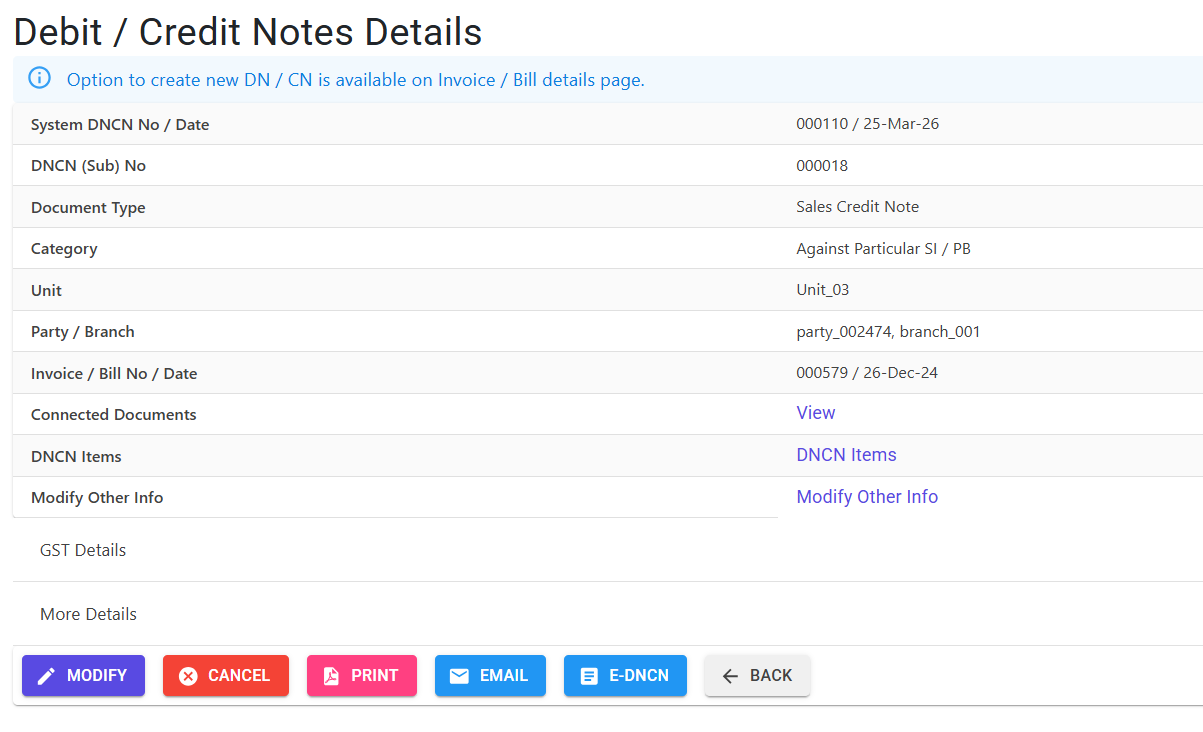
Compliance & Printing
- Save the document.
- If required, generate the E-DNCN (IRN).
- Print the document, which will include the E-Invoice QR code if generated.
5. Validations and Logic ⚠️
Main-Level (MI) Validations
- TCS Compliance: If
IsTcs = 'Y', both a TCS Code and a non-zero TCS Amount are strictly required. - Adhoc Guardails: For standalone notes, the Item ID, GST Rate, and Amount are mandatory.
- Backdating Protection: Dates cannot be earlier than the last recorded DNCN if stock updates are enabled.
- Transport Compliance:
- Road Mode: A valid Vehicle Number is mandatory.
- Other Modes: A valid LR No / Transporter Doc No is mandatory.
Line-Level (LI) Validations
- Quantity Guardrails:
DNCN Qtymust be greater than zero and cannot exceed the original Billed/Invoiced Qty. - Negative Stock Safeguard: For Debit Notes that update stock, the system checks the current System Stock Balance. If the return would result in a negative balance, the action is blocked.
- Manual Amount Invariant: If no quantity is specified (Rate adjustment), the Amount must be manually specified and greater than zero.
6. Automation & Safeguards 🛡️
E-Invoice (E-DNCN) Lock
Important
Once an E-DNCN has been generated and assigned an IRN, the document is PERMANENTLY LOCKED against modification or line-addition to ensure legal consistency with the GST portal.
Stock Rollback
If a DNCN that updated stock is deleted, the system automatically performs a Rollback on any associated QR (Sub-TRN) records to maintain physical inventory integrity.
7. Referential Integrity 🛡️
Modification or Deletion is STRICTLY PREVENTED if this note is linked to:
- GRN: If the debit/credit note was generated specifically to adjust a material receipt.
- Sales Rejection (SRN): If a Credit Note is tied to a formal Sales Return document.
- Cost Allocation (CC): If the financial value has already been allocated to project cost centers.
8. Related Reports 📊
- 📋 Debit/Credit Note Register: Chronological list of all adjustments with tax breakouts.
- 📦 Return Material Statement: Specifically tracks physical intake/outflow from PDN/SCN documents.
- 📑 DNCN GSTR Summary: Simplifies the manual entry of adjustments into your monthly GST returns.
9. Best Practices / Tips 💡
- Always Link Reference: Whenever possible, link to the parent Bill/Invoice. This ensures that “Billed vs. Returned” quantities stay in balance.
- Update Stock Wisely: Only set
IsUpdateStock = 'Yes'if the material is physically leaving or entering your premises. For pure price corrections, keep it as ‘N’. - Check Negative Stock: Before processing a return, ensure the items are still in your store and haven’t been issued to production!