FEMA (Foreign Exchange)
FEMA (Foreign Exchange) Module - User Guide

1. Introduction 📝
The FEMA (Foreign Exchange Management Act) module is designed to track the regulatory lifecycle of foreign exchange transactions. It monitors the progression of an international payment—from purchase intent and outward remittance to the final proof of import and bank reconciliation.
Business Purpose:
- Tracks compliance milestones required by banking and exchange control regulations.
- Ensures Outward Remittances (ORM) are paired with physical import documentation (BOE).
- Monitors the status of document submissions to authorized dealers (banks).
2. Transaction Lifecycle 🌏
The FEMA module follows a structured progression to ensure regulatory data integrity:
📄 Pro-Forma Invoice (PFI)
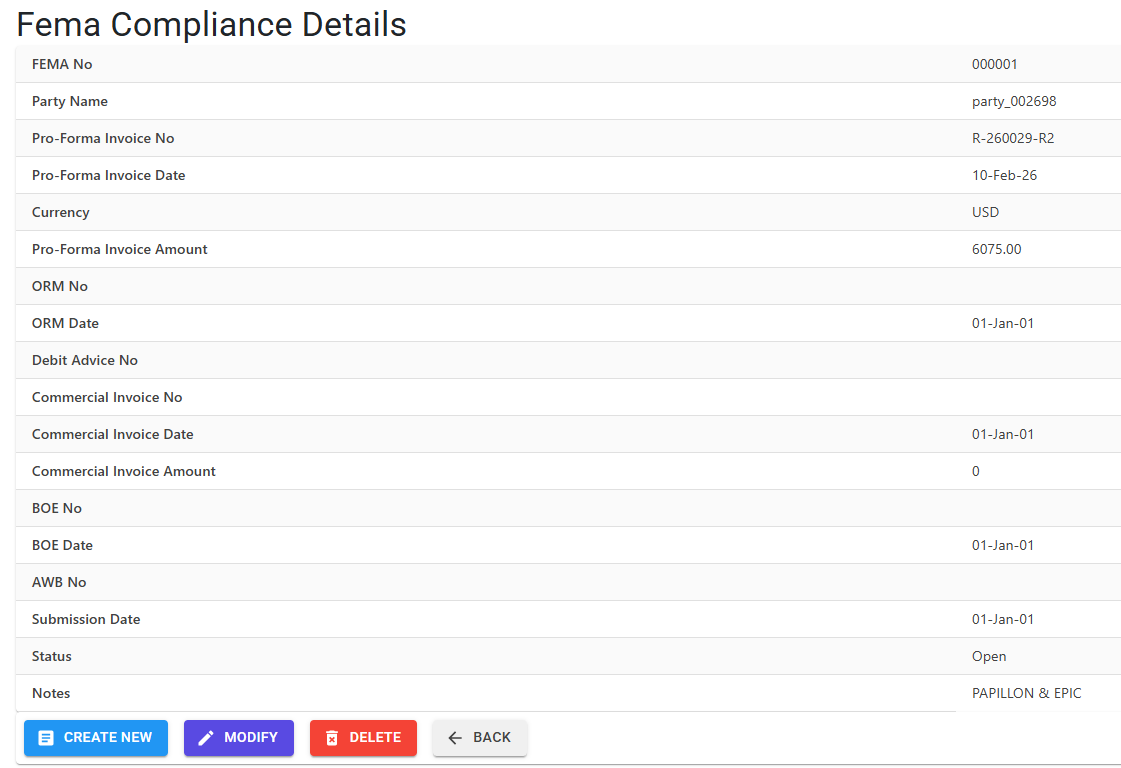
The initial purchase agreement. Records the PFI Number, PFI Date, and PFI Amount in foreign currency.
💸 Outward Remittance (ORM)
The actual foreign payment. Tracks the ORM Number and ORM Date of the fund transfer.
📦 Invoicing & Shipping
The final receipt of goods. Records the Commercial Invoice (No/Date/Amount), AWB/Bill of Lading Number, and the Bill of Entry (BOE) details.
🏦 Bank Submission
The close-out step. Tracks the Submission Date to the bank and any Debit Advice Numbers for transaction pairing.
3. Features ✨
🛡️ Sequential Milestone Enforcement
To maintain audit integrity, the system enforces a strict date-logic sequence when a FEMA record is set to “Completed” status:
- PFI -> ORM: Remittance date cannot precede the Pro-Forma Invoice date.
- ORM -> CI: Commercial Invoice date must follow the Remittance date.
- ORM -> BOE: Bill of Entry must be dated after the Outward Remittance.
- CI -> Submission: The bank submission date must be after the Commercial Invoice date.
📋 Checkpoint Invariants
The system provides “Conditional Mandatory” checks:
- If an ORM Date is entered, the ORM No becomes mandatory.
- If an Invoice Date is entered, the Invoice No becomes mandatory.
- If a BOE Date is entered, the BOE No becomes mandatory.
4. Validations and Logic ⚠️
Date Selection Guardrails
- Financial Year: Reporting and record creation default to the active fiscal year’s start date and today’s date.
- Range Limitation: In the FEMA Report, a maximum range of 2 years is permitted to ensure consistent performance.
- Future Dates: Strictly prohibited for both ORM and Submission dates.
Import/Export Error Controls
The module uses automatic log tracking for all generated reports, including the user and the date range specified, to maintain accountability for financial data extracts.
5. Complete Workflow 🔄
Record Initial Transaction
- Create a FEMA record with the Pro-Forma Invoice details.
- The system assigns a unique 6-digit FEMA Number (e.g.,
000215).
Record Remittance
- Update the record when the Outward Remittance (ORM) occurs.
- Enter the ORM No and Date.
Finalize Lifecycle & Reconcile
- Upon receipt of goods, enter the Commercial Invoice and BOE details.
- Set the FEMA Status to “Completed”.
- The system validates the entire date sequence (
PFI < ORM < CI < Submission) before allowing the update.
6. Reports 📊
- 📊 FEMA Report: An exhaustive 19-column Excel report (PFI, ORM, CI, BOE, AWB, Debit Advice, Status, Notes) used for bank reconciliation and regulatory monitoring.
- 📊 Pending Submission Report: Highlighting ORMs for which the final import proof (BOE) has not yet been submitted.
7. Best Practices / Tips 💡
- Debit Advice Check: Always cross-reference the
DebitAdviceNofield with your bank statement to ensure no transaction gaps. - Submission Timing: Aim to fill the
SubmissionDateas soon as the physical documents are courier to the bank to avoid compliance delays. - Audit Trail: Every “Add” or “Delete” action is logged in the system log. If deleting a FEMA record, ensure a clear “Delete Reason” is provided.