In Out Register (Gate Entry)
In Out Register (Gate Entry) Module - User Guide
1. Introduction 📝
The In Out Register (Gate Entry) module is the facility’s primary security and logistics checkpoint. It documents every physical entry and exit of vehicles and materials, ensuring that no goods move without a valid reference document (Invoice, Job Work, etc.) or authorized reason.
ℹ️
Purpose in the Workflow:
- Acts as the First Touchpoint for incoming material (Leads to GRN).
- Acts as the Final Touchpoint for outgoing material (Verifies Invoices/JW).
- Synchronizes physical Vehicle Numbers with digital ERP records.
- Prevents unauthorized or double-entry for the same reference document.
2. Getting Started with Gate Entry 🚀
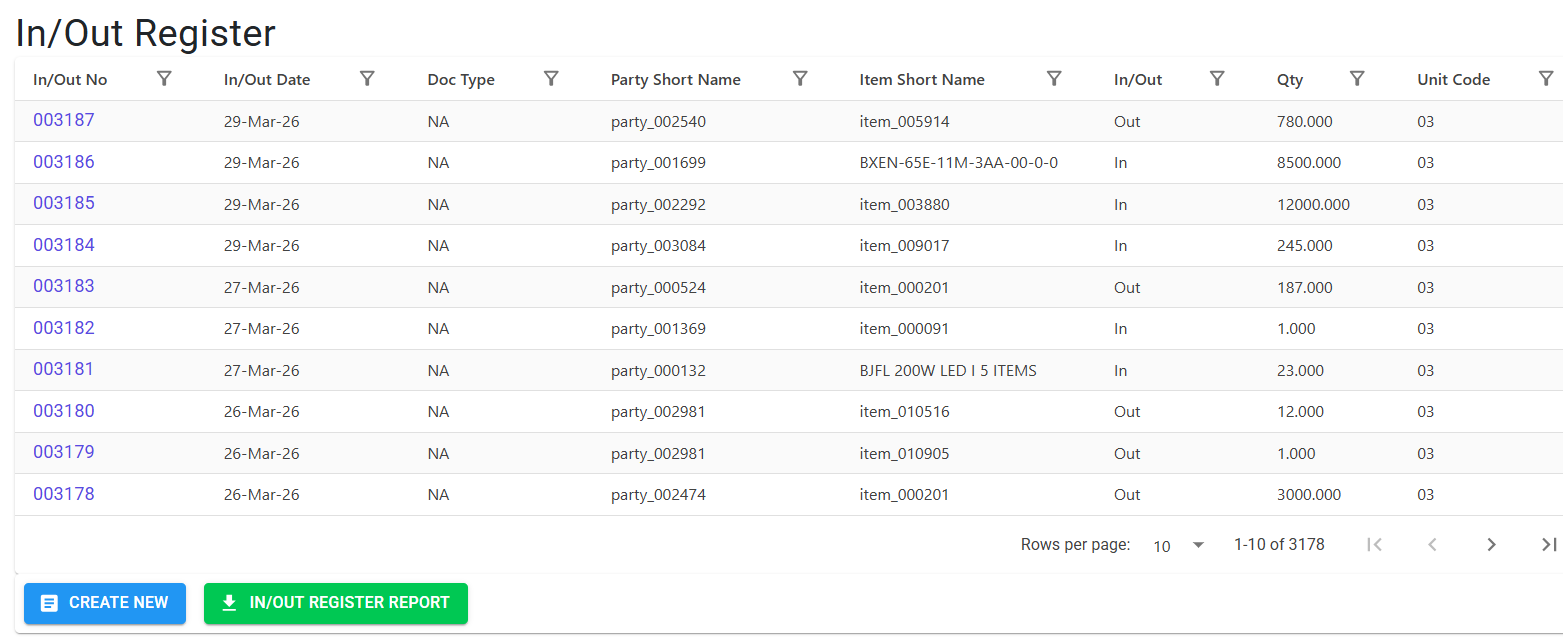
Accessing the Module
Navigate to the In Out Register via the Logistics or Security menu.
3. Movement Types 🚛
The system categorizes entries based on the direction of flow:
📥 IN (Inward)
Used for material arrivals, including:
- Purchase deliveries (Suppliers).
- Sales Returns (Customers).
- Job Work Inward (Return of processed parts).
- General inward (Courier, sample parts).
📤 OUT (Outward)
Used for material dispatches, including:
- Sales Dispatches (Customer Invoices).
- Job Work Outward (Sending parts to vendors).
- Purchase Returns (Sending back rejected material).
- General outward (Empty boxes, scrap).
3. Features ✨
🏗️ Intelligent Linking
- Reference Doc Connectivity: Direct integration with Sales Invoices, Job Work, and Purchase Bills.
- Manual Entry (Non-Standard): Support for one-off entries (e.g., couriers) using master-less names for Parties and Items.
🛡️ Logistics Safeguards
- Vehicle Matching: A strict cross-check that verifies the gate-entry vehicle number against the one recorded on the Invoice or Job Work.
- Double-Entry Prevention: Prevents the same Reference Number (e.g., Invoice 123) from being entered into the Gate Register more than once.
📑 Operational Precision
- RefNo Auto-Format: Automatically pads reference numbers to a standard 6-digit length (e.g., “75” becomes “000075”) to ensure consistent reporting.
- Gate Pass Printing: Immediate generation of a physical gate pass for the driver or security records.
4. Complete Flow 🔄
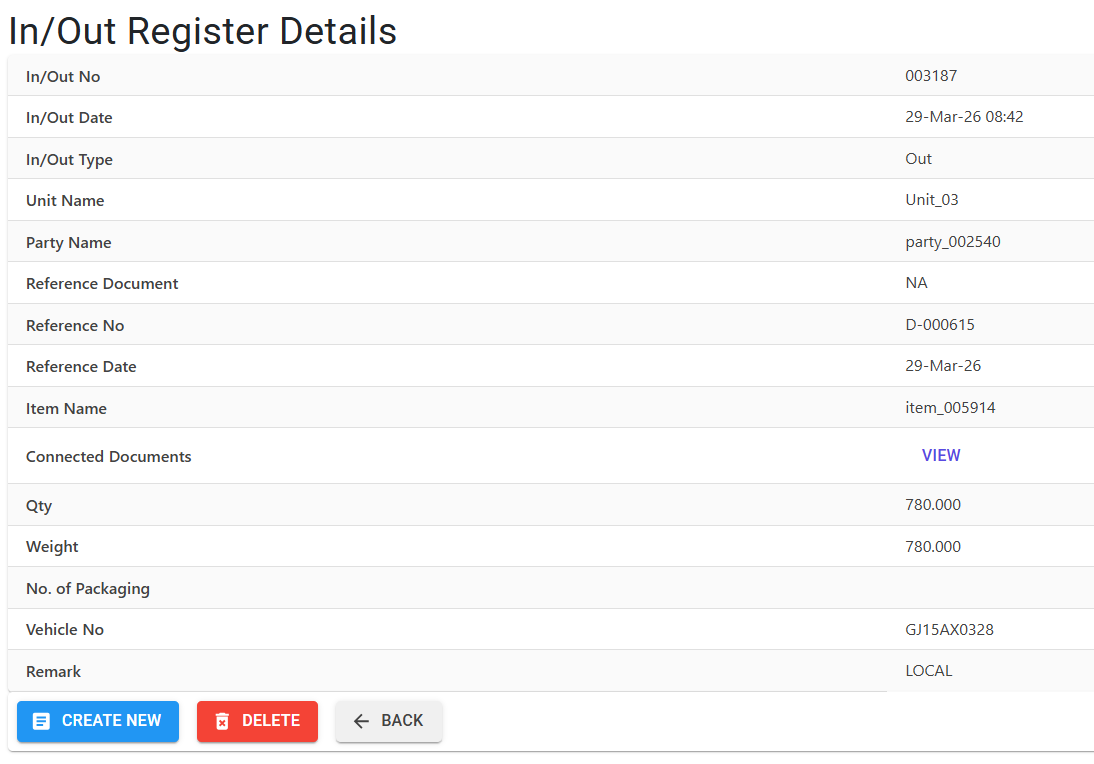
Record Vehicle Arrival
- Security captures the Vehicle Number and Driver Name.
- Security identifies the InOut Type (Inward/Outward).
Link Document
- Security enters the Ref No (Invoice No, JW No).
- The system pulls Party/Item details from the linked document.
- Non-Standard Entry: If no document exists (Reference NA), security manually enters the Party and Item names.
Validate Logistics
- The system performs a Vehicle Match Check.
- The system verifies the Packet Count (No. of Packaging) against the source invoice.
Save & Generate Pass
- Once saved, the entry is assigned a unique System In/Out No.
- Print the Gate Pass for the vehicle to proceed.
5. Validations and Logic ⚠️
Main-Level (MI) Validations
- Date Integrity: Every entry must fall within the Current Financial Year. Future dates or dates from closed years are strictly blocked.
- Reference Document Safeguards:
- Sales Invoice/Job Work: The system validates that the document exists and is not cancelled.
- Vehicle Mismatch: If the Vehicle Number entered at the gate differs from the one on the Invoice/JW, the system blocks the entry.
- Packaging Mismatch: If the
PacketNo(No. of Packaging) differs from the source document, the entry is blocked to prevent partial-package loss.
- Adhoc/Non-Standard Fallback: If “Reference NA” is selected, at least one name (Either Party Master or Manual Party Name) must be provided. The same apply to items.
- Duplicate Check: A specific rule prevents creating a second In/Out entry for the same
RefNo + RefDate + RefDoccombination.
6. Referential Integrity 🛡️
Deletion is STRICTLY PREVENTED if this Gate Entry has been linked to:
- GRN: If an Inward Gate Entry has already been processed into a Goods Receipt Note.
- Sales Rejection (SRN): If the entry is linked to a customer return.
⚠️
Note for Operations:
If an error was made at the gate, you must first delete the downstream GRN or SRN (if allowed) before the Gate Entry record can be modified or deleted.
7. Bulk Operations & Reporting 📊
- 📊 Excel Register: A comprehensive report generated with:
- Frozen Headers: Keeps the date and headers visible during scrolling.
- Auto-Wrapped Notes: Ensures multi-line remarks are fully visible without adjusting column widths.
- Color-Coded Rows: Highlights different movement types for easy scanning.
8. Best Practices / Tips 💡
- Zero-Mistake Linking: Always search for the Reference Document first. Linking ensures that the Party, Item, and Packaging details are accurate without manual typing.
- Vehicle Consistency: If the vehicle number was swapped after the Invoice was printed, the Invoice must be updated before the Gate Entry can be saved.
- Remark Accuracy: Use the Remarks field to note the condition of the vehicle or any visible seal-breaks upon arrival.