Purchase Bill (Supplier Invoice)
Purchase Bill (Supplier Invoice) Module - User Guide
1. Introduction 📝
The Purchase Bill module is the final verification stage for incoming material and services. It transforms physical receipts (GRNs) into financial liabilities, ensuring that the supplier is paid only for what was contracted and correctly received.
ℹ️
Role in the Ecosystem:
- Validates the Supplier’s Invoice against the internal GRN quantites and rates.
- Updates the Accounts Payable (Sundry Creditors) balance.
- Facilitates ITC (Input Tax Credit) tracking for GST compliance.
- Acts as a base for Payment Vouchers.
2. Getting Started with Bills 🚀
Accessing the Module
Navigate to the Bill Index to view all recorded purchase invoices.
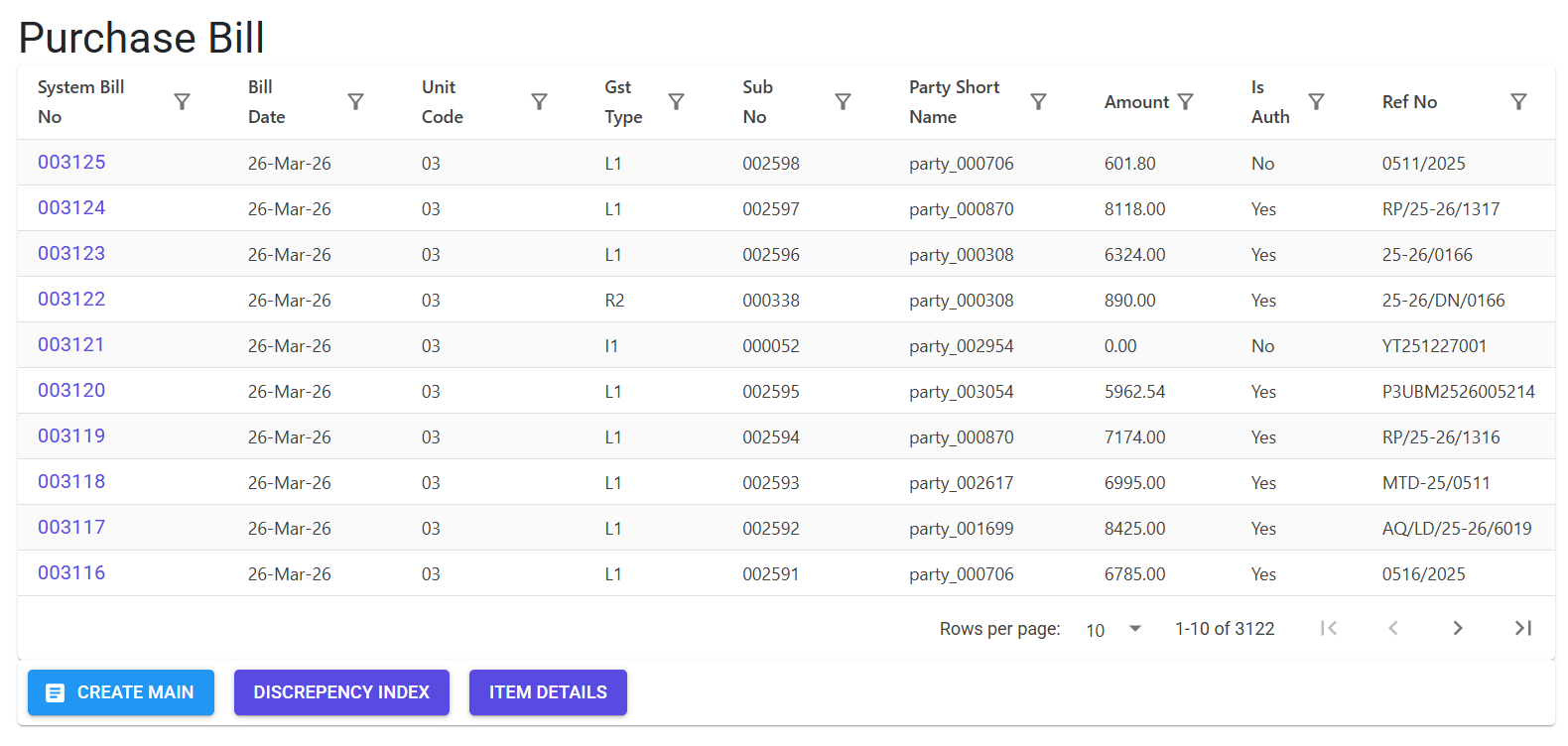
Types of Invoices
- GRN-Based Bill: Standard workflow where a bill is linked to one or more GRNs.
- Direct Bill (Non-GRN): Used for overheads or services where physical intake (GRN) is not captured (Restricted by system parameters).
- Imported Purchase: Specialized bill for foreign vendors with FCNR support.
3. Features ✨
🏗️ Fulfillment & Coordination
- Entire GRN Import: One-click import for simple 1-to-1 supplier invoices.
- Partial Fulfillment: Allows linking a single GRN line to multiple partial bills (e.g., staggered billing or advance payments).
- Carrier Link: Allows linking a purchase bill (e.g., freight expense) back to a Sales Invoice to accurately track landing costs and order margins.
🛡️ Compliance & Safety
- Amount Mismatch Alert: A strict UI safeguard that triggers a “Difference between Internal Bill and Supplier Bill” alert, blocking authorization until values align.
- Authorization Lifecycle: Bills must be formally Authorized before they can be paid via a Voucher or adjusted via a Debit Note.
- GSTR-2B Automation: Integrated email engine to notify suppliers if their invoices are missing from the GSTR-2B portal (ensures claimable ITC).
4. Complete Flow 🔄
Initialize Main Header
- Select the Supplier (Party) and Unit.
- Enter the Supplier Bill No and Supplier Date. The system performs a duplicate-check for this Party + Bill No combination.
Add Line Items
- From GRN: Select from a list of pending GRNs for the chosen party.
- Non-GRN: Manually add items/services (Requires
ForceIndent4AllBills = N). - Import XL: Bulk upload non-GRN lines via a standardized Excel template.
Validate & Save
- Ensure Taxable Value and GST Rates match the physical document.
- Save the document. It moves into a “Pending Authorization” state.
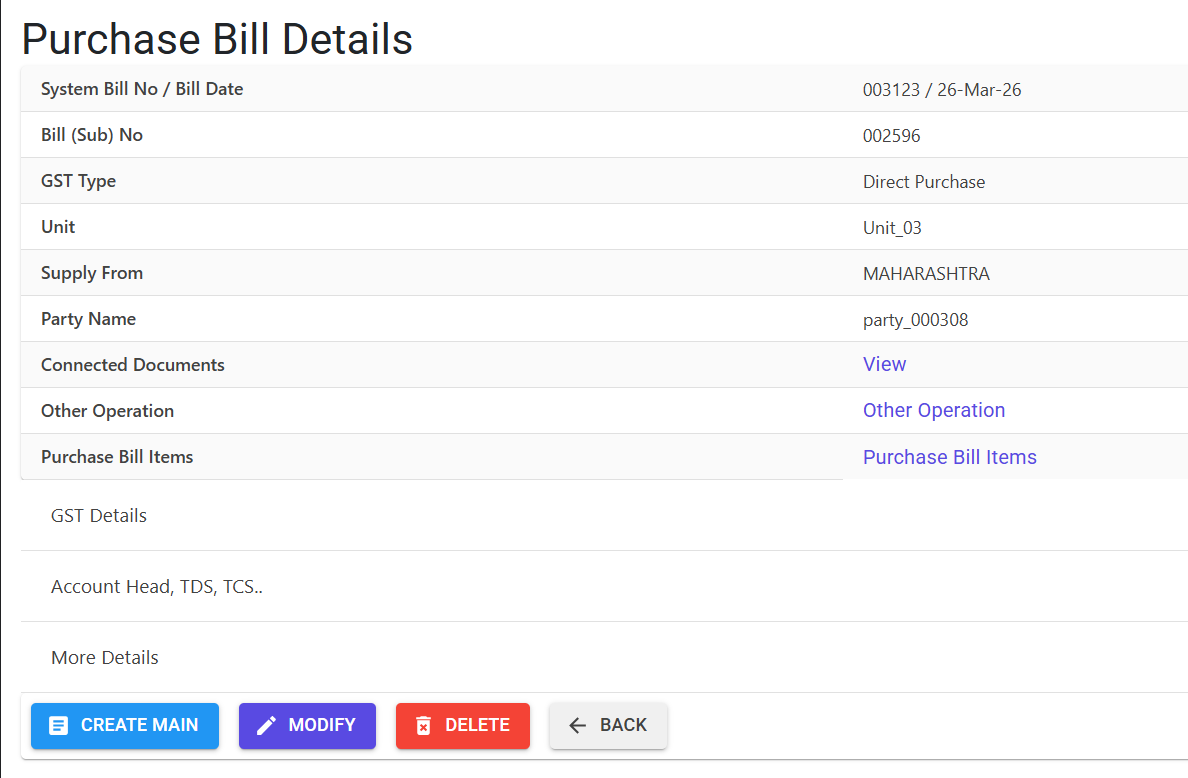
Authorize & Pay
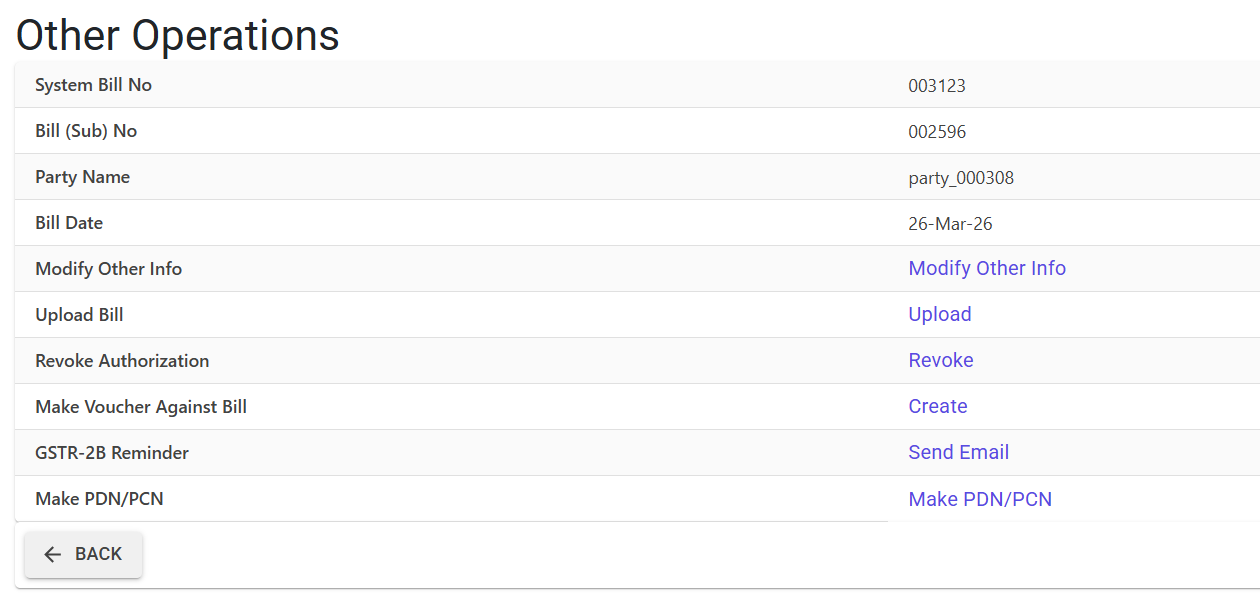
- Navigate to [Other Operations].
- Review the totals. If clean, click Authorize.
- Generate a Payment Voucher or a Debit/Credit Note directly from the authorized bill.
5. Validations and Logic ⚠️
The Purchase Bill module is the primary filter for financial accuracy.
Main-Level (MI) Validations
- Import Rigor (Gst Type I1):
InputTypecannot be default; must specify type of import.FCNR Amountmust be greater than zero.Supply Frommust be “Other Countries” (Code 96).BE No / Port Nois strictly mandatory.
- GST Consistency:
- If a party is registered, the
SupplyStateCodemust exactly match their GSTIN prefix in the Party Master. - Unregistered Interstate Block: For unregistered parties, interstate supply is blocked (Home State must match Supply State) to prevent tax leakage.
- If a party is registered, the
- Due Date Guard:
DueDatecannot be earlier than theBill Date. - Duplicate Supplier Bill No: Prevents double-booking by warning if the same supplier invoice number was used for that party previously.
Line-Level (LI) Validations
- Fulfillment:
Billed Qtycannot exceed thePending GRN Qty. - Account Mapping: For specific transaction types, an Accounts Particular must be manually mapped for cost center tracking.
- HSN Integrity: Requires a valid 6-8 digit HSN code for all items to ensure GST reporting accuracy.
- Carrier Linking: If linking to a Sales Invoice, the system validates the
Invoice Sub Noexists and contains validCarrier Chargesto be absorbed.
6. System Parameters ⚙️
- ForceIndent4AllBills: When set to ‘Yes’, the user is strictly restricted to GRN-based billing. The “Create Non-GRN” and “Import Non-GRN” options are hidden in the UI to enforce a clean procurement audit trail.
- AuditTrail: All modifications (Edit/Delete Line/Delete Main) are logged with high granularity, including the “Before/After” value diffs.
7. Referential Integrity & Safeguards 🛡️
Modification or Deletion is STRICTLY PREVENTED if any of the following are linked:
- Voucher: If a payment has already been issued against the bill.
- Journal Voucher (JV): If financial adjustments have been made via a JV.
- Debit / Credit Notes (DNCN): If a Purchase Return (PDN) or Price/Rate adjustment (PCN) has been booked.
- Cost Allocation (CC): If the bill’s expenses have been allocated to specific project/department cost-centers.
- Bill of Exchange (BE): If linked to a BE for trade financing.
- Sales Invoice: If the bill is linked as a carrier charge to a sales invoice (Modification is blocked; Deletion may be allowed depending on user rights).
8. Related Reports 📊
- 📋 Purchase Register: Detailed item-wise and tax-wise list of all booked bills.
- 💰 Outstanding Payables: Ageing analysis of bills pending for payment.
- 📊 GSTR-2B Reconciliation Summary: Helps identify gaps between booked books and supplier filings.
9. Best Practices / Tips 💡
- Authorize Early: Authorization is the trigger for downstream financial actions. Once verified, authorize immediately to allow the accounts team to process payments.
- Check the Alert: If you see a red alert regarding the Supplier Bill Amount, do not ignore it. The system will block authorization until the difference is resolved.
- GSTR-2B Reminders: Use the “Send Email” feature in Other Operations to prompt suppliers about missing invoices before your GST filing date.