QA Protocol
QA Protocol Module - User Guide
1. Introduction 📝
The QA Protocol module is the bridge between the physical receipt of materials and their final approval for production. It allows for a formal quality inspection after a Goods Receipt Note (GRN) has been created, ensuring that only “Pass” materials enter the primary inventory.
Purpose of the QA Protocol:
- To record Quality Inspection Results (Accepted vs. Rejected).
- To link Test Certificates to specific batches of material.
- To automate Financial Adjustments via one-click Debit Note generation.
- To maintain Traceability by updating QR labels with final inspection status.
Typically, this module is used by Quality Control (QC) Engineers and Inspectors.
2. Getting Started with QA 🚀
Accessing the Module
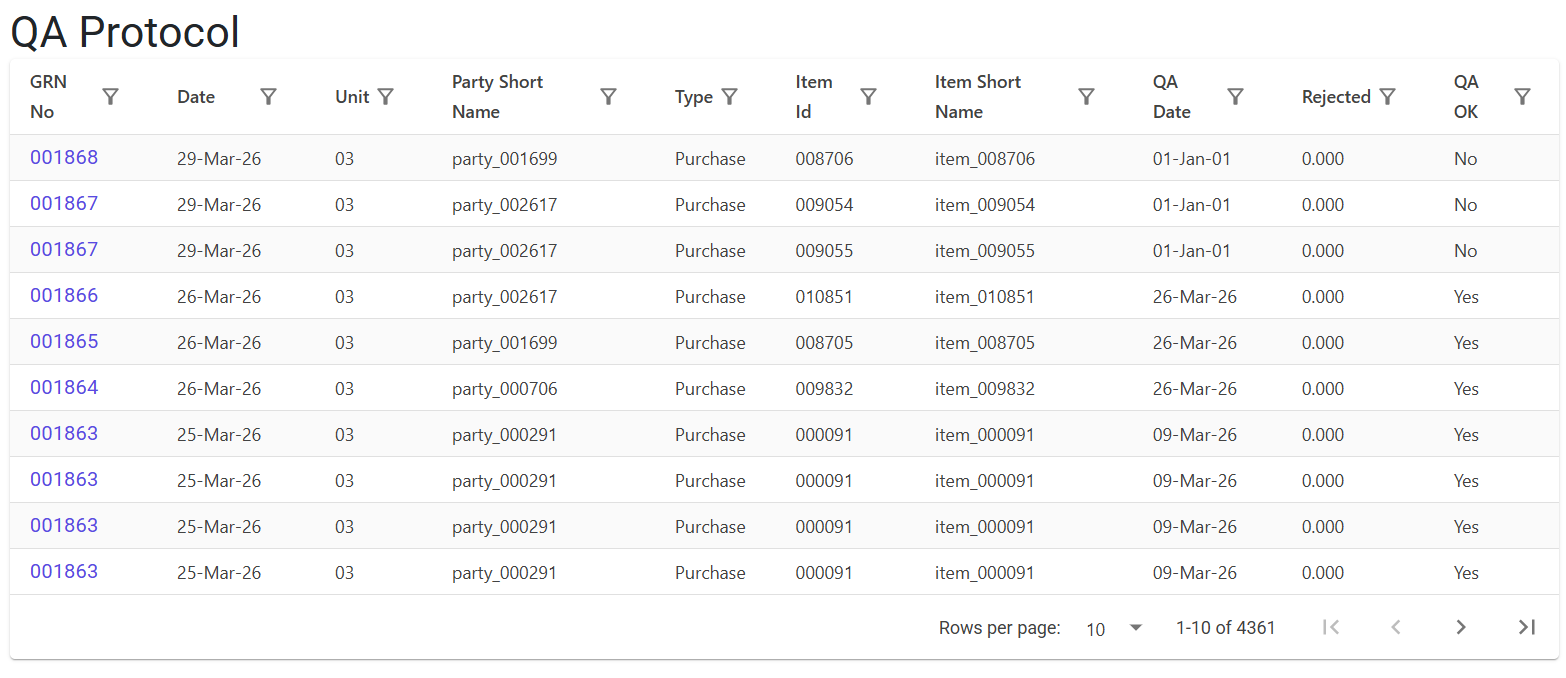
Navigate to the QA Protocol Index to view all pending and completed inspections.
Workflow Trigger
A record appears in the QA Protocol Index automatically as soon as a GRN is saved. Materials stay in a “QC Pending” state until the protocol is finalized.
3. Features ✨
🏗️ Inspection Management
- Quantity Refinement: Adjust the final Accepted and Rejected quantities.
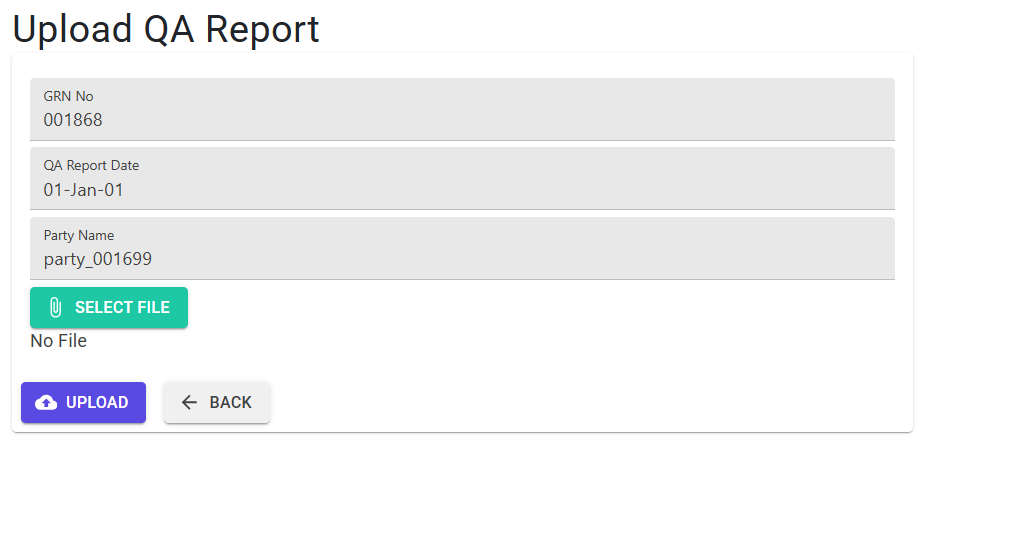
- Document Attachment: Upload scanned QA Reports or Supplier Certificates directly to the record for digital archiving.
💰 Financial Automation
- Auto-PDN (Purchase Debit Note): If materials are rejected, the system can automatically generate a Debit Note to ensure the supplier is not paid for faulty goods.
🏷️ QR Integrity
- Packet-Level Status: Updates the Sub-TRN Status to “Accepted” or “Rejected” across all 300+ potential packets for an item.
4. Complete Flow 🔄
Entry Selection
- Locate the GRN item in the QA Protocol Index.
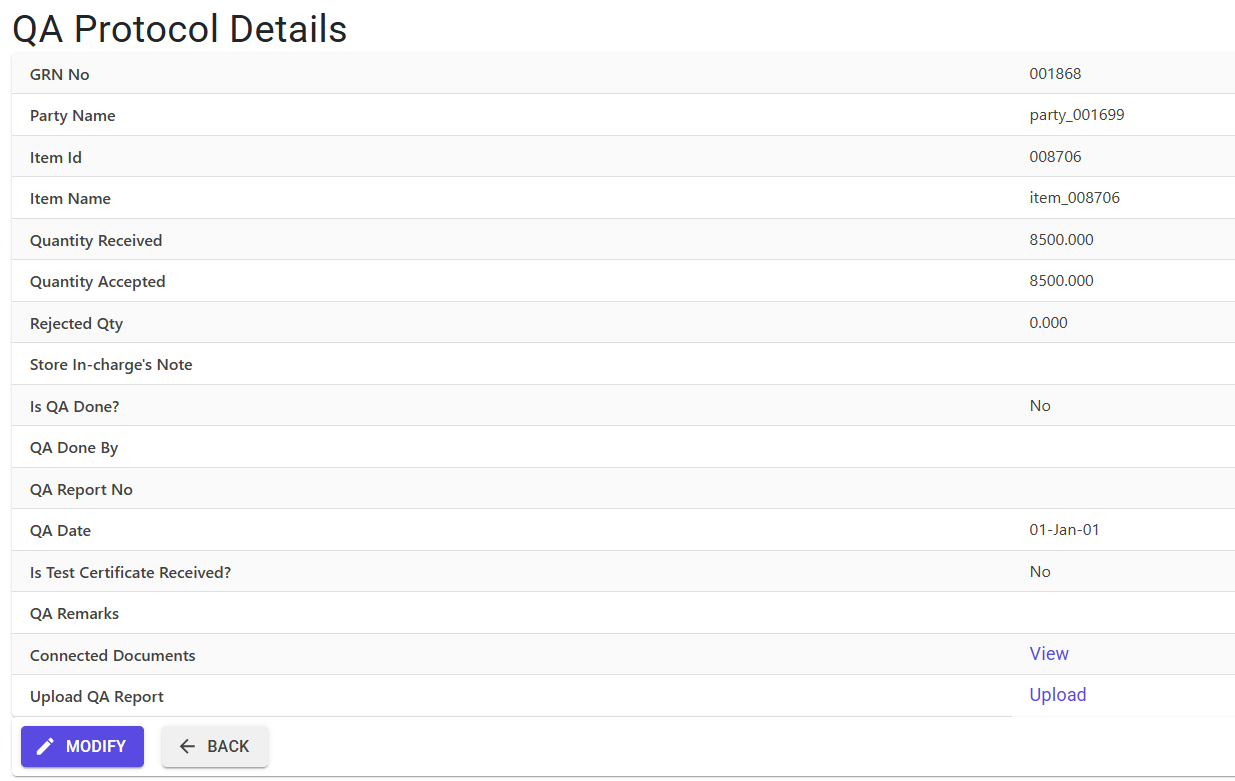
- Click Modify to start the inspection detail entry.
Inspection Data
- Set the Is QA OK? flag to Yes or No.
- Enter the QA Report No and QA Report Date.
- Toggle Is Test Certificate Received? if applicable.
Quantity Adjustment
- Refine the Rejected Qty. The system ensures the total (
Accepted + Rejected) remains equal to the original Received Qty.
PDN Generation (Optional)
- If the rejected quantity is greater than zero, use the “Auto Create PDN” button in the Details view to book a Purchase Return (Code 10).
5. Validations and Logic ⚠️
The QA Protocol preserves the balance between physical stock and financial reliability.
Segmented Validations
- Quantity Invariant: The system strictly enforces the rule:
Accepted Qty + Rejected Qty = Received (Challan) Qty. You cannot approve or reject more than what was originally received. - QC Compliance: If the “Is QA OK?” flag is set to Yes, both the QA Report No and QA Report Date become mandatory fields.
- Negative Stock Safeguard: Before allowing a high Rejected Qty, the system checks if the material has already been consumed by production. If rejections would result in Negative Stock, the action is blocked.
Packaging & QR Logic
- Exact Multiple Rule: Any adjustment to the
Accepted Qtymust still satisfy the “exact multiple of box” rule. For example, if yourQty Per Boxis 50, you can only accept 50, 100, or 150 units. - Packet Cap: The system maintains the 300-packet limit for QR labeling even after QA adjustments.
6. Automation & Safeguards 🛡️
The Auto-PDN System
This feature streamlines purchase returns by:
- Validating Role: Requires the
DebitCreditCreateprivilege. - Master Dependency: Checks if Transaction Type Code 10 (Purchase Return) is configured in the Transaction Type Master.
- Automatic Sizing: Fetches the Next Doc No for the Debit Note and links it permanently to the GRN line.
S3 File Management
- Naming Convention: All uploaded reports are stored in S3
- Traceability: Files can be downloaded directly from the Details Index.
Deletion & Modify Protections
- Linked Bills: If the GRN has already been booked into a Purchase Bill, modification is restricted to prevent discrepancies between QC status and financial payouts.
- QR Rollback: Any change in quantity triggers a
SubTrnDelete, which erases the old labels and re-assigns status to new ones to ensure labels in the plant always reflect the latest QA status.
7. Related Reports 📊
- 📋 QA Protocol Register: A summary of all Pass/Fail inspections within a specific date range.
- 📦 Rejected Material Report: Tracks the volume and value of materials rejected from specific suppliers for quality audits.
- 📑 Vendor Quality Audit: A performance metric based on the percentage of materials failing QA Protocol.
8. Technical Observations 🔍
- MFGLog: All QA updates are logged as
Grn Editwith the specificTRN Idnoted in the audit trail. - Currency Support: Rejection values are calculated using the 4-decimal currency precision of the parent GRN.
9. Best Practices / Tips 💡
- Upload Immediately: Always upload the scanned PDF of the supplier’s test certificate. This makes it instantly available to the production team.
- Auto-PDN for Rejections: Don’t wait for the accounting team to book a return. Use the Auto Create PDN button to secure the credit immediately.
- Store Coordination: If rejecting material, ensure the Store In-charge has moved the physical items to the Rejected Yard to match the system stock.