Ceiling & Floor Price Master
Ceiling & Floor Price Master - User Guide
1. Introduction 🔍
The Ceiling & Floor Price Master (CFP) acts as the “Financial Guardrail” for your organization. It allows management to set strict price boundaries for items across different currencies, preventing unauthorized discounting below a certain level or unapproved purchasing above a certain cost.
2. Getting Started with Ceiling & Floor Price Master 🚀
Accessing the Module
To access the CFP Master module, navigate to the Common Masters > Ceiling/Floor Price Master section from the main menu.
The Index Page
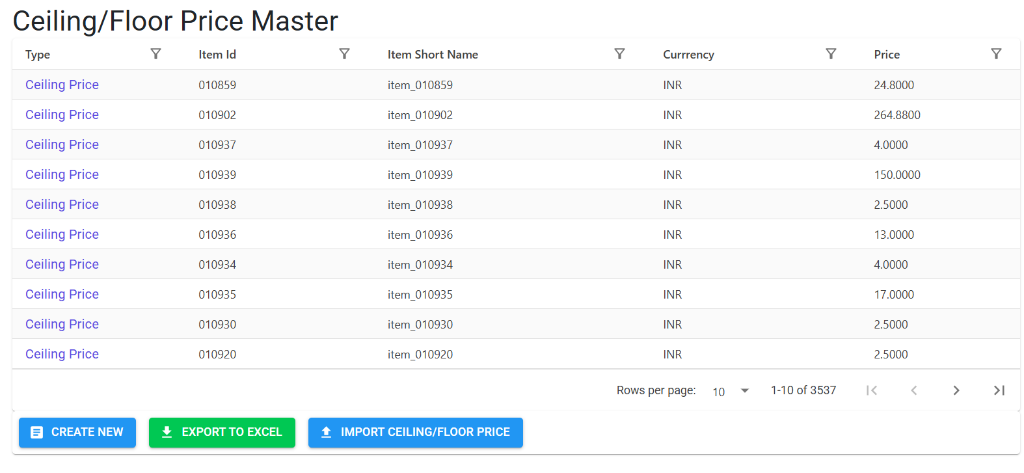
Upon opening, the Index Page displays all active price boundaries. Here, you can:
- Verify Boundaries: See the Type (Ceiling/Floor), Item Id, and current Price at a glance.
- Filter: Quickly find records for specific item groups or currencies.
- Bulk Tools: Use Create New, Export to Excel, or Import to manage large price lists.
Modifying Price Boundaries
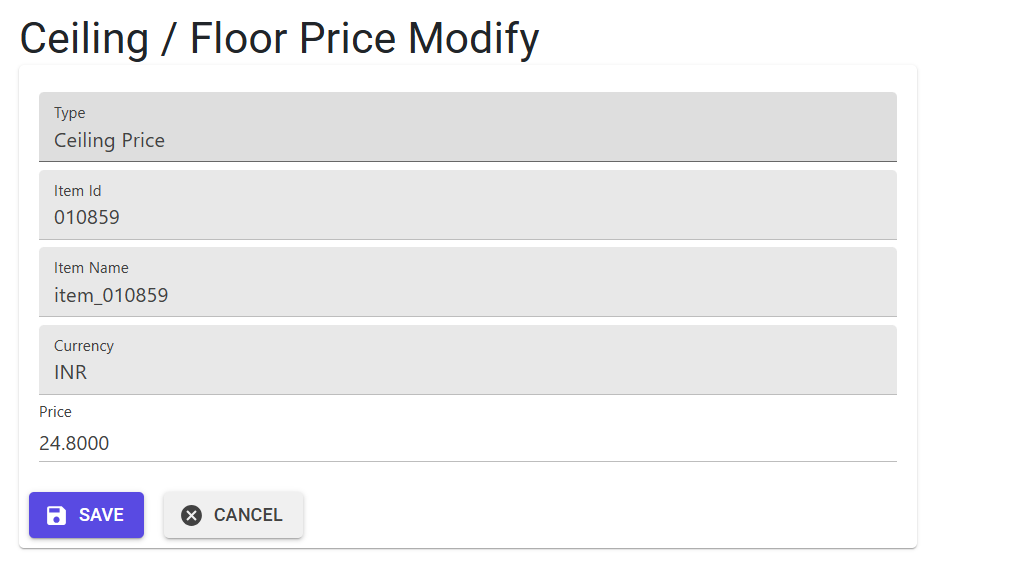
Since core identity fields are immutable, the Modify interface focuses on safe price adjustments:
- Context: Displays the Type, Item Id/Name, and Currency for verification.
- Price Adjustment: Enter the new numeric value. The system will automatically run validation checks against the corresponding Floor/Ceiling pair before saving.
3. Core Concepts 💡
A. Floor Price (Minimum Selling Price)
The “Floor” is the absolute lowest price at which an item can be sold.
- Purpose: Prevents sales teams from offering discounts that erode core profitability.
- Enforcement: If enabled in system parameters, the system will block any Sales Order or Price List entry where the Price is lower than the Floor.
B. Ceiling Price (Maximum Purchase Cost)
The “Ceiling” is the absolute highest price at which an item can be procured.
- Purpose: Prevents procurement teams from overpaying for raw materials or services.
- Enforcement: If enabled, the system will block any Purchase Order or Cost Master entry where the Cost exceeds the Ceiling.
4. Business Validations & Rules 🛡️
The CFP Master enforces strict data integrity to prevent financial errors:
- Unique Combination: You can only have one record for a specific Item + Currency + Type (Ceiling/Floor) combination.
- Cross-Type Comparison:
- When creating a Floor Price, it must be Higher than the existing Ceiling Price for that item/currency.
- When creating a Ceiling Price, it must be Lower than the existing Floor Price for that item/currency.
- Status Management: Unlike other masters, these records cannot be deleted. They can only be modified to adjust the price levels as market conditions change.
5. Bulk Operations & Import Logic 📂
The module supports high-volume data management via Excel within few clicks
6. Lifecycle & Data Integrity 🔒
🚫 Modification & Deletion Preventions
- Permanent Records: For audit and financial control reasons, Deletion is disabled in this module.
- Immutable Identity: Once created, you cannot change the Item, Currency, or Type. You can only update the
Price. - System Parameter Dependencies: The enforcement of these prices in Sale/Purchase transactions depends on the following system flags:
SalePriceNotBelowFloorPriceCostPriceAboveCeilingPrice
7. Best Practices 💡
- Standardize Currencies: Always ensure the currency matches the regional price lists (e.g., set Floors in USD for export items and INR for domestic).
- Seasonal Review: Use the Export to Excel feature quarterly to review boundary prices against current market volatility.
- Audit Trail: Since these prices control your margins, ensure only authorized financial managers have access to this Master.