Cost Price Master
Cost Price Master - User Guide
1. Introduction 💳
The Cost Price Master is the central repository for your procurement costs. It links specific Suppliers/Vendors, Items, and Brands to a primary Purchase Cost, serving as the benchmark for material acquisition.
ℹ️
Key Objectives:
- Purchase Control: Define benchmark procurement costs to identify overspending.
- Currency Precision: Record international purchase costs in original currencies.
- Safety Compliance: Ensure acquisition costs never exceed the company’s mandated “Ceiling Price”.
2. Getting Started with Cost Price Master 🚀
Accessing the Module
To access the Cost Price Master module, navigate to the Common Masters > Cost Price Master section from the main menu.
The Index Page
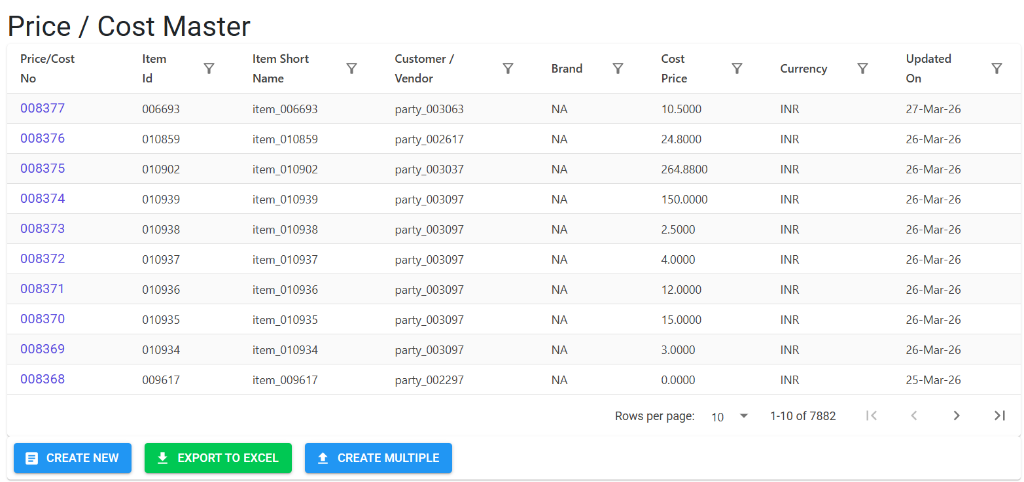
Upon opening, the Index Page displays a detailed list of vendor-specific material costs. Here, you can:
- Filter & Search: Quickly find records by Item, Customer/Vendor, or Brand.
- Review Financials: View the current Cost Price and Currency for each record.
- Bulk Management: Access buttons for Create New, Export to Excel, and Create Multiple.
Cost Master Details
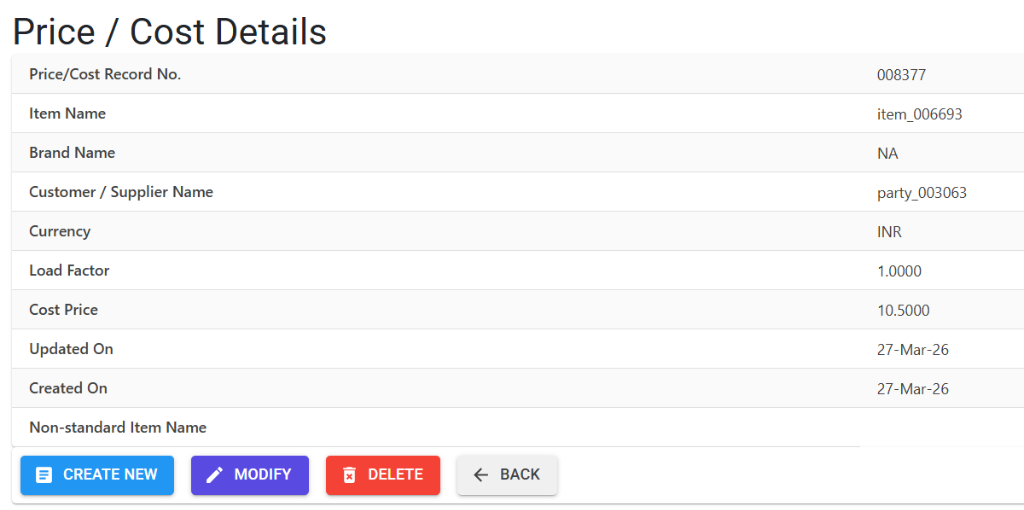
The Details view provides a snapshot of the procurement linkage and commercial terms:
- Identification: Displays the record number, item name, and supplier name.
- Commercial Details: Manage the Cost Price, Load Factor, and see the automated system dates.
- Validation Guards: The system validates the entered cost against primary currency rules and optional ceiling prices.
3. Structural Identity 🛠️
Each cost record is defined by a unique combination:
- Vendor: The Supplier supplying the item.
- Item: The specific raw material or component.
- Brand: The brand being procured.
- Currency: The purchase currency (e.g., USD, INR, etc.).
4. High-Security Business Guards 🛡️
A. Ceiling Price Guard (Optional)
If the system parameter CostPriceAboveCeilingPrice is active:
- The system checks the Ceiling & Floor Price Master.
- For Raw Materials (RM) and Process Materials (PM), the cost price must be equal to or lower than the mandated Ceiling Price.
B. Currency & Load Factor
- INR Costs: For transactions in Indian Rupees, the Load Factor must be
1.0000. - Foreign Currency: The load factor (Range: 1.0000 to 999.9999) accounts for multipliers in internal accounting for non-INR assets.
C. Range Validations
- Standard Range: Cost Prices must fall between 0.0001 and 99,999,999.9999.
5. Bulk Operations 📂
- Import Multiple: Use the Excel import tool to upload vast price lists from your suppliers.
- Export to Excel: A reporting feature used by the procurement department to analyze cost trends.
6. Lifecycle & Data Integrity 🔒
🚫 Deletion Preventions
To protect integrated pricing models:
- Dual-Role Check: You cannot delete a Cost Price record if it also has a Sale Price (Selling Price) assigned to it. This prevents accidental deletion of pricing benchmarks for items that are both bought and sold.
- MFG Log: Any creation or edit in the Cost Master is recorded with a timestamp and the user ID.
7. Pro Tips 💡
- Consistent Brand Management: Always double-check that the Brand linked in the Cost Master matches the Brand in the Inventory Master to ensure reporting accuracy.
- Non-Standard Items: Use the “Notes” field to specify if the cost includes additional services or unique vendor-specific material grades.