Party Item Code Master
Party Item Code Master - User Guide
1. Introduction 🔗
The Party Item Code Master is a cross-reference system used to bridge the gap between your organization’s internal item nomenclature and the codes used by your Customers and Vendors.
In global supply chains, a single product (e.g., Steel Bolt 10mm) might be known as SB-10 internally, but as Part-998 by a major customer and M-Bolt-X by a supplier. This master ensures that your ERP can communicate using the party’s own language.
2. Getting Started with Party Item Code Master 🚀
Accessing the Module
To access the Party Item Code Master module, navigate to the Common Masters > Party Item Code Master section from the main menu.
The Index Page
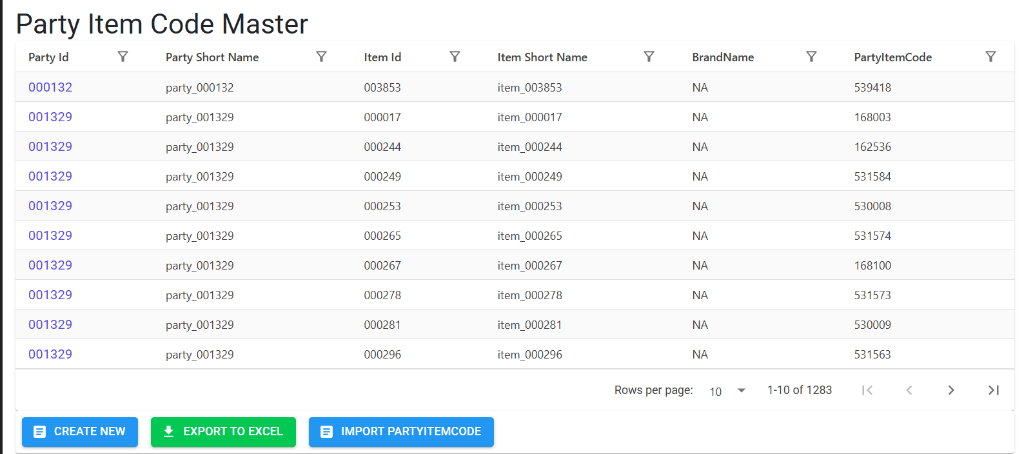
Upon opening, the Index Page shows the current mapping between internal and external part numbers. Here, you can:
- Verify Mappings: See at a glance which internal Item ID is linked to which PartyItemCode for a specific Party.
- Filter: Search by Party ID, Item Name, or the custom Party Item Code.
- Management Tools: Access Create New, Export to Excel, and Import PartyItemCode for bulk updates.
Party Item Code Master Details
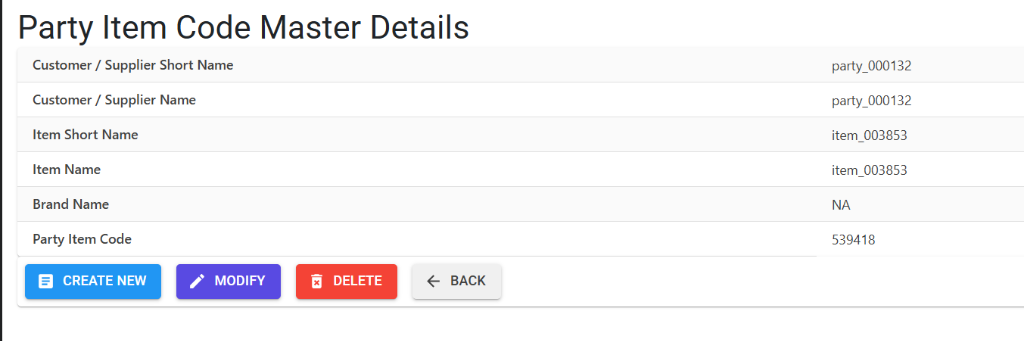
The Details view allows you to capture the specific alias for an item:
- Context: Review the Customer/Supplier Name and Internal Item Name to ensure the correct link.
- Alias Mapping: Enter the specific Party Item Code that the customer or vendor uses for this item.
- Workflow: Options to Modify or Delete existing mappings as your business requirements evolve.
3. Core Business Purpose 🎯
- Customer Satisfaction: Automatically print the customer’s part number on Invoices, Packing Lists, and Delivery Challans.
- Procurement Accuracy: Use the vendor’s own item codes on Purchase Orders to eliminate errors during fulfillment.
- Regulatory Compliance: Meet labeling requirements for specific industries (e.g., Automotive/Aerospace) where customer-specific part numbers are mandatory on all documentation.
4. Structural Identity 🛠️
A mapping record is defined by three primary anchors:
- Party: The specific Customer or Vendor.
- Internal Item: Your organization’s standard item record.
- Brand: The specific brand association for the item.
Unique Constraint: The system prevents duplicate mappings. You can only have one active Party Item Code for a unique combination of Party, Item, and Brand.
5. Business Validations & Rules 🛡️
- Mapping Format: The
Party Item Codecan be up to 100 characters long, accommodating complex alpha-numeric strings or global identifiers (GS1/GTIN). - Duplicate Prevention: During creation or import, the system verifies if a mapping for that Party/Item/Brand already exists to prevent data corruption.
- Modification: Users can update the code itself, but the core anchors (Party/Item/Brand) are protected once the record is established.
- Format Normalization: All codes are automatically converted to UPPERCASE and trimmed of leading/trailing spaces for consistency.
6. Bulk Management 📂
The module supports high-volume mapping via the Create Multiple (Excel Import) tool.
Import Validation Codes
| Code | Meaning | Business Impact |
|---|---|---|
| A | Invalid Party | The Party ID does not exist or is inactive. |
| B | Invalid Item | The Item ID does not exist in the Inventory Master. |
| C | Invalid Brand | The Brand ID is not recognized by the system. |
| D | DB Duplicate | A mapping for this Party/Item/Brand already exists in the ERP. |
| E | XL Duplicate | Multiple rows in your Excel file are trying to map the same combination. |
7. Lifecycle & Deletion 🔒
- Standard Deletion: Unlike price-sensitive masters, Party Item Codes can be deleted if they are no longer required.
- Data Synchronization: Deleting a mapping does not affect the underlying Item or Party records; it simply removes the “alias” link between them.
8. Best Practices 💡
- Sync with Contracts: Update these mappings whenever a customer updates their part catalog or you sign a new supply agreement.
- Standardize Imports: Use the Export to Excel feature periodically to audit existing mappings and identify any outdated or missing aliases.
- Collaboration: Procurement and Sales teams should collaborate to ensure that “Party Short Names” are consistent across both internal records and external labels.