Sale Price Master
Sale Price Master - User Guide
1. Introduction 💰
The Sale Price Master is where you define the selling prices for your products. It allows for a highly granular pricing strategy by linking prices to specific Customers, Items, and Brands.
ℹ️
Key Objectives:
- Customer-Specific Pricing: Set different rates for different clients.
- Currency Flexibility: Manage international pricing in the customer’s preferred currency.
- Safety Compliance: Ensure prices never drop below the company’s mandated “Floor” or exceed the statutory “MRP”.
2. Getting Started with Sale Price Master 🚀
Accessing the Module
To access the Sale Price Master module, navigate to the Common Masters > Sale Price Master section from the main menu.
The Index Page
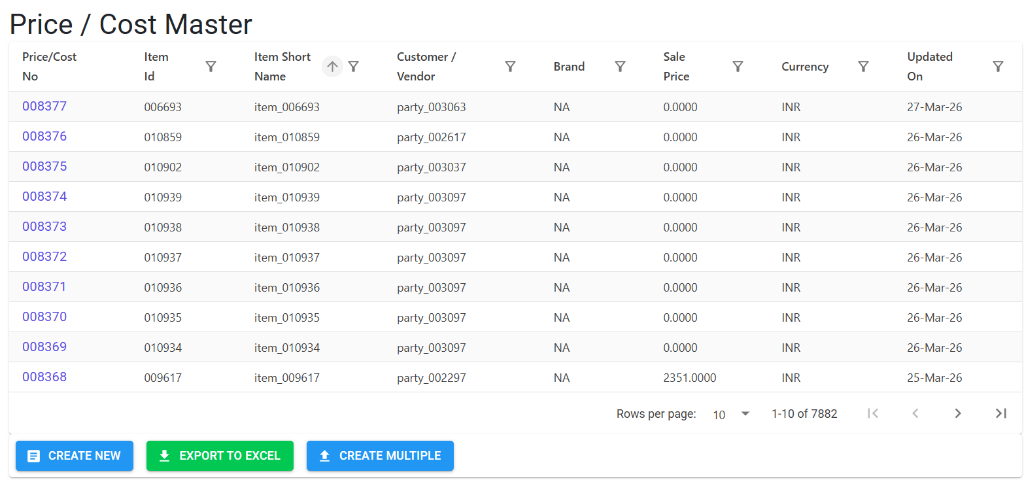
Upon opening, the Index Page displays all customer-specific price lists. Here, you can:
- Filter & Find: Search for records by Item Name, Customer/Vendor, or Brand.
- Review Prices: Instantly see current Sale Prices and Currency across your product line.
- Bulk Tools: Use Create New, Export to Excel, or Create Multiple for high-volume price updates.
Price / Cost Details
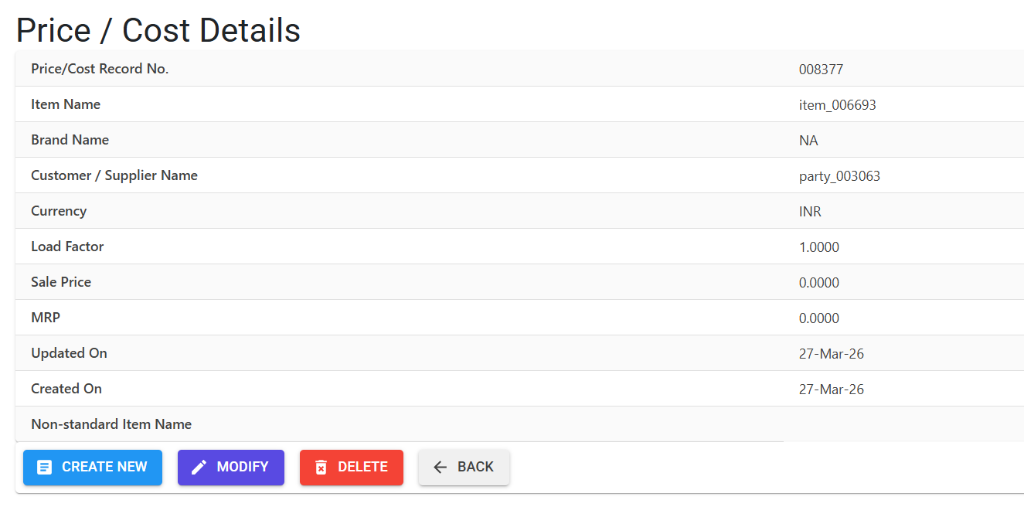
Clicking on a record opens the Details view, providing a comprehensive data summary:
- Identification: Displays the record number, item name, and customer link.
- Commercials: Manage the specific Sale Price, MRP, and Load Factor.
- Audit Transparency: See the creation and last updated dates to track contract validity.
- Custom Variant Notes: A dedicated section to document any non-standard item details.
3. Structural Identity 🛠️
A single price record is identified by a unique combination of four factors:
- Customer: The Party receiving the price.
- Item: The specific product or service.
- Brand: The brand association for the item.
- Currency: The currency in which the price is quoted.
4. Critical Business Rules & Guards 🛡️
A. Floor Price Guard (Optional)
If the system parameter SalePriceNotBelowFloorPrice is active:
- The system scans the Ceiling & Floor Price Master.
- Any Sale Price entered must be equal to or higher than the mandated Floor Price.
B. MRP Guard
- The system validates that the Sale Price never exceeds the Maximum Retail Price (MRP).
- The MRP must be a number between 0 and 999,999.9999.
C. Currency & Load Factor
- INR Pricing: For records in Indian Rupees (INR), the Load Factor must be exactly
1.0000. - Foreign Currency: For other currencies, the load factor represents the exchange or multiplier complexity (Range: 1.0000 to 999.9999).
5. Bulk Management 📂
- Import Multiple: Use the Excel import tool to upload bulk price lists.
- Export to Excel: Auditing feature to review current price lists across the organization.
6. Lifecycle & Data Integrity 🔒
🚫 Deletion Preventions
To maintain data consistency between sales and procurement:
- Dual-Role Check: You cannot delete a Sale Price record if it also contains a Cost Price (Purchase Cost). If the record serves both purposes, the Cost must be cleared or the entire record handled with caution.
- Audit Trail: Every creation and modification is logged in the system’s MFG Log for transparency.
7. Pro Tips 💡
- Notes for Non-Standard Items: Use the “Notes” field to document specific characteristics if you are pricing a custom or variant item.
- Regular Audits: Use the “Export to Excel” feature before fiscal year changes to ensure all customer contracts are up to date.