GST State Master
GST State Master - User Guide
1. Introduction 📝
The GST State Master is a foundational statutory master in your ERP. It maintains the official list of Indian States and Union Territories (UTs) along with their government-assigned GST codes. This master ensures that your invoices, E-Way Bills, and E-Invoices always use the correct geographical identifiers for tax compliance.
ℹ️
Key Objectives of GST State Master:
- Official Coding: Maintain the mandatory 2-digit GST state codes (e.g., 27 for Maharashtra).
- Tax Type Determination: Automate the decision between IGST and CGST+SGST.
- Statutory Filing: Ensure consistent state data for GSTR-1 and GSTR-3B preparation.
2. Interface Walkthrough 🏗️
Accessing the Module
To access the GST State Master, navigate to System Tools > Other Masters > GST State Master from the main menu.
The Index Page
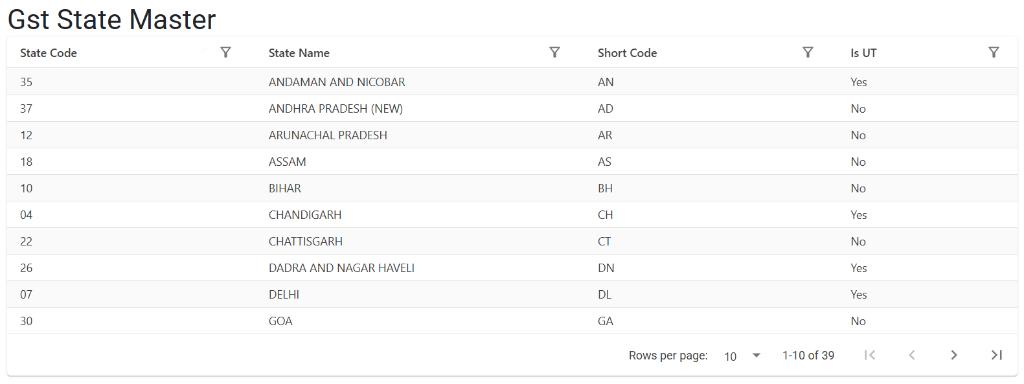
The GST State Master Index serves as the central directory for all geographic codes used in the system. From this screen, you can:
- Verify Codes: Ensure every state has its correct 2-digit official GST code.
- Identify UTs: Easily spot regions marked as Union Territories (Yes/No).
- Search and Sort: Use the column filters to quickly find specific states by code or name.
3. Core Attributes 🏗️
A. State Code (The Mandatory 2-Digit ID)
- Definition: The official 2-digit numeric code assigned by the GST Department (e.g.,
27for Maharashtra,09for Uttar Pradesh,07for Delhi). - Criticality: These codes are mandatory for all GST-compliant documents and electronic reporting.
B. State Name & Short Code
- State Name: The full legal name of the State or Union Territory.
- Short Code: A 2-character abbreviation (e.g.,
MH,UP,DL).
C. Union Territory (UT) Flag
- Concept: Identifies whether the region is a Union Territory.
- Payroll & Tax Impact: If ‘Yes,’ the system applies UTGST instead of the usual SGST for local transactions within that region.
4. The Logic of Tax Determination 🛡️
The GST State Master is the “brain” behind your ERP’s automated tax selection:
- Place of Supply: The system compares the State Code of your own company (defined in Company Master) with the State Code of your customer or supplier (defined in Account Master).
- Intrastate (Local): If the state codes are the Same, the system applies CGST + SGST (or UTGST).
- Interstate: If the state codes are Different, the system automatically applies IGST.
5. Usage Guidelines 📋
Verifying State Information
- Navigate to System Tools > Other Masters > GST State Master.
- Review the list of States and Union Territories.
- Ensure that the State Short Code and State Code match the official GST portal specifications.
6. Deletion & Modification Rules 🛡️
🚫 Safety Preventions
- Deletion Lockdown: You cannot delete a State that is currently being used in any Company or Account profile.
- Compliance Rule: Do not modify the 2-digit State Code unless there is an official government notification. An incorrect state code will lead to the rejection of your E-Invoices and E-Way Bills.
7. Related Reports 📈
📑 State-wise Sales Analysis
- Purpose: Tracks which states contribute most to your revenue based on the customer’s state code.
- Navigation: Sales > Reports > Sales Analysis.
📑 GSTR-1 Data Preparation
- Purpose: These codes are exported directly into the offline utility for filing GST returns.
8. Best Practices 💡
- New UTs: If a new Union Territory is formed (e.g., Ladakh), ensure the correct IsUT flag and the new official code (e.g., 38) are updated immediately in this master.
- Master Consistency: Always ensure the State selected in a Customer’s address matches their GSTIN prefix (the first two digits of their GST number).