TCS Master
TCS Master - User Guide
1. Introduction 📝
The TCS Master manages the Tax Collected at Source (TCS) categories and rates as required by the Indian Income Tax Act. TCS is a tax collected by a seller from the buyer at the time of the transaction. This master ensures that your sales invoices correctly calculate and account for these statutory obligations.
Key Objectives of TCS Master:
- Statutory Compliance: Maintain up-to-date tax rates for various sections of the Income Tax Act (e.g., Section 206C).
- Automated Calculation: Enable the sales module to instantly calculate tax based on predefined rates.
- Threshold Management: Facilitate the tracking of sales thresholds (like the 50-Lakh limit for Sale of Goods).
2. Interface Walkthrough 🏗️
Accessing the Module
To access the TCS Master, navigate to System Tools > Other Masters > TCS Master from the main menu.
The Index Page
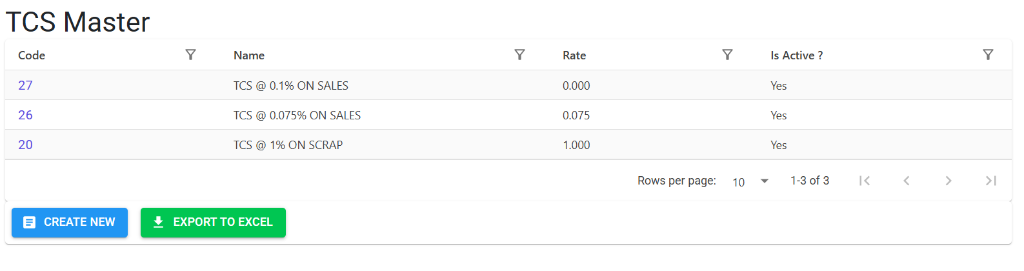
The TCS Master Index provides a summarized list of all your tax collected at source categories. From this screen, you can:
- Check Rates: Quickly see the percentage rate assigned to each TCS name.
- Monitor Active Status: Verify which tax slabs are currently enabled for use in invoicing.
- Export to Excel: Download the entire list for audit and reporting.
The Details Page
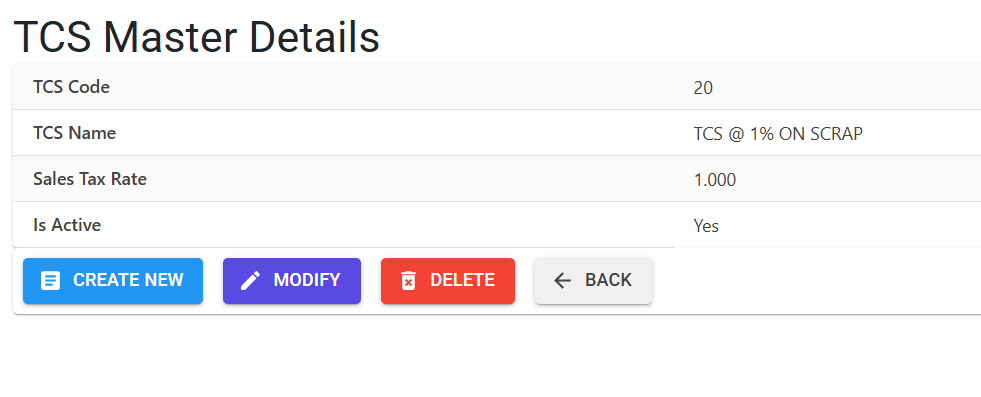
Clicking on a TCS Code or Name opens the Details View, where you can manage specific data:
- TCS Identity: Review the system-assigned code and descriptive name.
- Rate Management: Verify the precise percentage value (e.g., 1.000%) for automated calculation.
- Management Actions: Use the Modify button to update the name or rate, or the Delete button if the record has not been linked to any transaction.
3. Core Attributes 🏗️
A. TCS Identity
- TCS Name: The descriptive name for the tax category (e.g., “TCS on Scrap,” “TCS on Sale of Goods”).
- TCS Code: A unique 2-digit code (e.g.,
01,02) automatically assigned by the system.
B. Tax Rate
- TCS Rate: The percentage value of the tax.
- System Constraint: The rate must be between 0.100% and 20.000%.
- Is Active: A flag to enable or disable the tax category.
4. Integration & Usage 🔄
The TCS Master is a critical link in the Sales lifecycle:
👥 Party Master Linkage
You can assign a default TCS category to a Customer in the Account Master.
- Benefit: When you create a Sales Invoice for that customer, the system will automatically prompt or apply the correct TCS rate.
📄 Sales Invoicing
During invoice generation, the ERP uses the rates defined here to calculate the tax amount on the total invoice value (including GST). This ensures your financial books and government payments are perfectly aligned.
5. Usage Guidelines 📋
Creating a New TCS Category
- Navigate to System Tools > Other Masters > TCS Master.
- Click Create New.
- Enter a descriptive TCS Name (e.g., “TCS ON SALE OF GOODS @ 0.1%”).
- Enter the TCS Rate (e.g.,
0.100). - Save the record. The system will assign a unique TCS Code automatically.
6. Deletion & Modification Rules 🛡️
🚫 Safety Preventions
- Active References: The system will block you from deactivating or deleting a TCS code if it is currently linked to any active Customer in the Party Master.
- Historical Accuracy: Changes to a TCS rate will not retrospectively change old invoices. It will only apply to new transactions.
- 99 Record Limit: To ensure system efficiency, the master is limited to 99 unique entries.
✏️ Editing Names
You can modify the name for better clarity. The system will automatically convert the text to UPPERCASE and trim any excess spaces for clean reporting.
7. Related Reports 📈
📑 TCS Summary Report
- Purpose: Provides a consolidated list of all taxes collected from customers, ready for your quarterly TCS return filings.
- Navigation: Finance > Statutory Reports > TCS Reports.
📑 TCS Master List (Excel)
- Export Tool: You can export the entire master list to Excel for a quick audit of active vs. inactive tax slabs.
8. Best Practices 💡
- Section Mapping: Include the Income Tax section in the Name (e.g., “TCS 206C(1H) - 0.1%”) to help your accounts team during auditing.
- Regular Audits: Tax rates can change due to government budget updates. Review this master annually or whenever a new Finance Bill is passed.
- Double-Check Rates: Ensure the rate matches the buyer’s status (e.g., higher rates if the buyer has not filed their tax returns).